Herdr 外掛
儲存庫附了兩個選用的 Herdr 外掛。兩者都不會隨 pi 套件一起安裝。
側邊欄的網檢視
Section titled “側邊欄的網檢視”herdr-plugin/ 裡的外掛,把側邊欄的 Agents 清單變成網。它先列主塔台的工作區(主塔台存在之後),接著在每個工作區裡列出塔台、每個分頁的主智慧體與成員,而每個子智慧體都緊接在啟動它的 session 之下,即使在 worktree 工作區也一樣。Herdr server 一啟動,這個檢視就是開的,一個按鍵可以關掉再開回來。它需要 Herdr 0.9.5 或更新版本與 node。
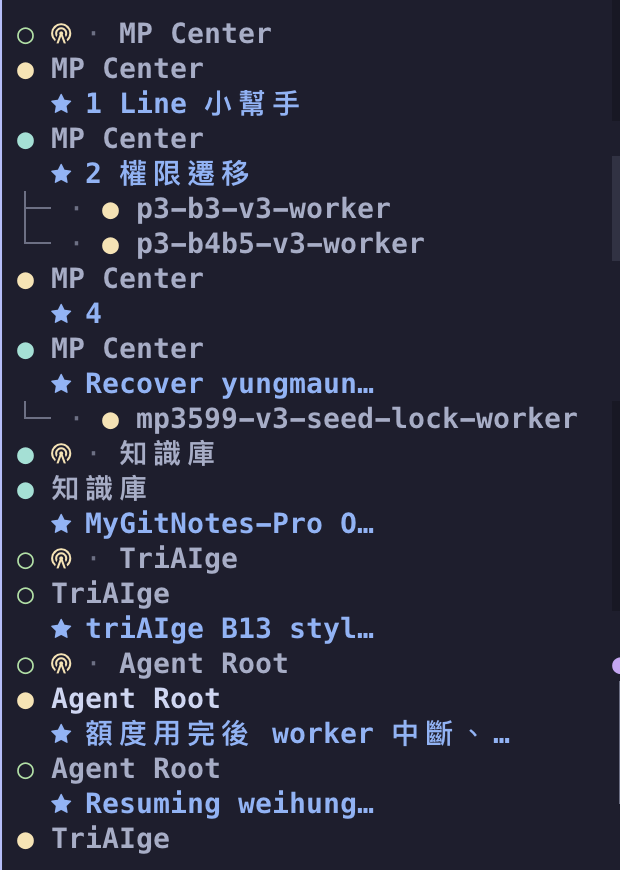
從 GitHub 安裝,或連結一份 checkout:
herdr plugin install wayne930242/pi-straw-boss/herdr-plugin# orherdr plugin link /path/to/pi-straw-boss/herdr-plugin在 Herdr 的 config.toml 綁一個按鍵,然後執行 herdr server reload-config:
[[keys.command]]key = "prefix+alt+n"type = "plugin_action"command = "wayne930242.straw-boss.net"description = "toggle the straw net view"在 Windows 上,action 是 wayne930242.straw-boss.net-windows。herdr plugin unlink wayne930242.straw-boss 會移除外掛。
pi-straw-boss 會寫入排序鍵(sb_order)、角色標籤(sb_mark),並在子智慧體上寫入樹狀分支(sb_indent)與子智慧體的名稱(sb_name),你自己的側邊欄列也可以用。sb_mark 每種種類各有一個字符,所以側邊欄看得出差別;整合員的是 code-fork,監控者的是狗。token 與 rows 範例見側邊欄網檢視。
殘留的 worktree pane
Section titled “殘留的 worktree pane”herdr-reaper/ 裡的外掛,負責清理在 worktree 工作區裡跑過的智慧體留下的東西。
- Pane。 在資料夾是已連結的 git worktree 的工作區裡,等智慧體已退出、且 pane 的 shell 閒置時,它會關掉那個 pane,但絕不關掉有焦點的 pane。接著 Herdr 會關掉分頁與工作區。
- Checkout。 當
git status是乾淨的、且沒有別的東西在用它時,它會移除該工作區的 checkout。被 git 忽略的檔案(.env、node_modules、快取、本機資料庫)不會讓 checkout 變髒,所以會一起被刪掉。分支一律保留,髒的 checkout 也保留,原因寫在外掛的 log 裡。 - 保留。 pi-herdr-agents 建立的 worktree 會保留,直到它的父 session 用
worktree_remove移除它(或父 session 已沉默 72 小時);你的某個程序正在裡面工作的 checkout 也會保留。有已初始化 submodule 的 checkout,只有在不會遺失任何 commit 時才會移除。 - 主 checkout 工作區。 Herdr 為主 checkout 開的一般 shell 工作區(用來把 worktree 歸在底下),在該儲存庫已沒有 worktree 工作區、且只剩閒置 shell 時會被關掉。
- 釘選。 被釘選的工作區絕不被清理,它的 checkout 也絕不被移除。重新命名工作區會立刻釘選它,
pinaction 可以切換釘選。
它每 10 分鐘掃一次,並在智慧體退出後一分鐘再掃一次,reap-now action 則立刻掃。每次關閉、移除、略過與釘選,都是外掛 log 裡的一行(herdr plugin log list --plugin wayne930242.straw-boss-reaper)。它需要 Herdr 0.9.3 或更新版本、git 與 node 18 或更新版本,且只在 macOS 與 Linux 上執行:在 Windows 上,Herdr 不會回報 pane 的 shell 正在執行什麼。
herdr plugin install wayne930242/pi-straw-boss/herdr-reaper[[keys.command]]key = "prefix+i"type = "plugin_action"command = "wayne930242.straw-boss-reaper.pin"description = "pin or unpin the workspace"
[ui.sidebar.spaces]rows = [["state_icon", "workspace", { token = "$pin" }], ["branch", "git_status"]]herdr plugin link /path/to/pi-straw-boss/herdr-reaper 改為連結一份 checkout,herdr plugin unlink wayne930242.straw-boss-reaper 移除外掛。規則與限制見 Worktree reaper。