Feedback
Every page has a feedback panel: select a passage and comment on it, or click a node or an edge in a diagram, then send all your comments with an overall note in one message. It is for what no block asks: “this step is wrong”, “why this arrow?”.
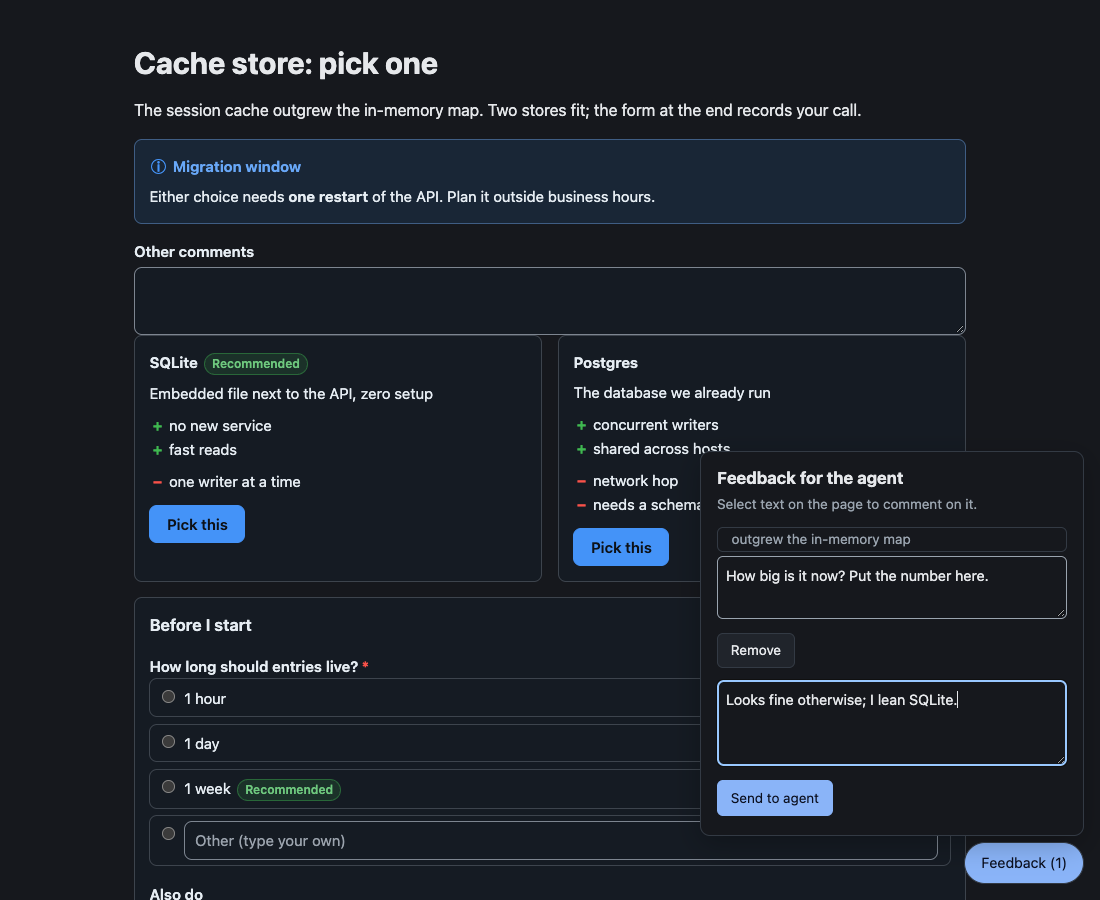
Comment on a passage
Section titled “Comment on a passage”- Select text on the page. A Comment button appears beside it.
- Press it, and write your comment in the panel.
- Add more passages if you like, write an overall note, and press Send to agent.
Your drafts stay in the tab, so they survive the reload an agent’s edit causes. The agent receives:
User feedback on the page "Cache store: pick one":
> Either choice needs one restart of the API.Can we do it on Sunday?
Overall: Go with SQLite.
Comment on a diagram
Section titled “Comment on a diagram”In a flowchart or a state diagram, click a node, an edge (its line or its label), or a subgraph title. From the keyboard, Tab to the diagram, move to the element with the arrow keys, and press Enter or Space; Escape in the panel takes you back to it. It joins the panel as a quote in the diagram’s own words, so the agent can find it in the source it wrote.
> [Diagram 2, stateDiagram-v2] edge: Paid → Refunded "money back"How a quote reads
- It starts with the diagram’s position among the page’s diagrams and its type, then
node: <label>,edge: <from> → <to>(with the edge’s label in quotes), orgroup: <title>. - A quote names exactly one element. When two elements would read alike, it adds the node’s id (
node: Check (B)) or a number in drawing order (#2, or##2when a label has a#of its own), and an edge names its ends as their own quotes do (edge: Check (A) → Done). - A state diagram’s
[*]readsstartorend, scoped by its composite state when there are several (node: start (in Active)), andstart ([*])beside a state namedstart. - Clicking an element again reopens its draft. When the agent’s edit reloads the page with diagrams added or removed, a draft’s quote names its diagram’s new position. A quote whose diagram itself changed keeps its position, and adds
(from an earlier version of the page)when another quote reads the same; a new comment on the element now at that position is a separate draft. - Only flowcharts and state diagrams have targets; other diagrams stay plain images.
The reference draws how a click becomes a quote.
Pages the agent wrote
Section titled “Pages the agent wrote”An HTML or TSX page runs in a sandboxed frame, so the page around it carries the same panel: select text in the frame and comment on it. Diagrams in a frame cannot be clicked; select their text instead. See Agent pages.
- Agent pages: pages with their own script.
- Block reference: the blocks you can answer.