Herdr plugins
Two optional Herdr plugins ship in the repository. Neither is installed with the pi package.
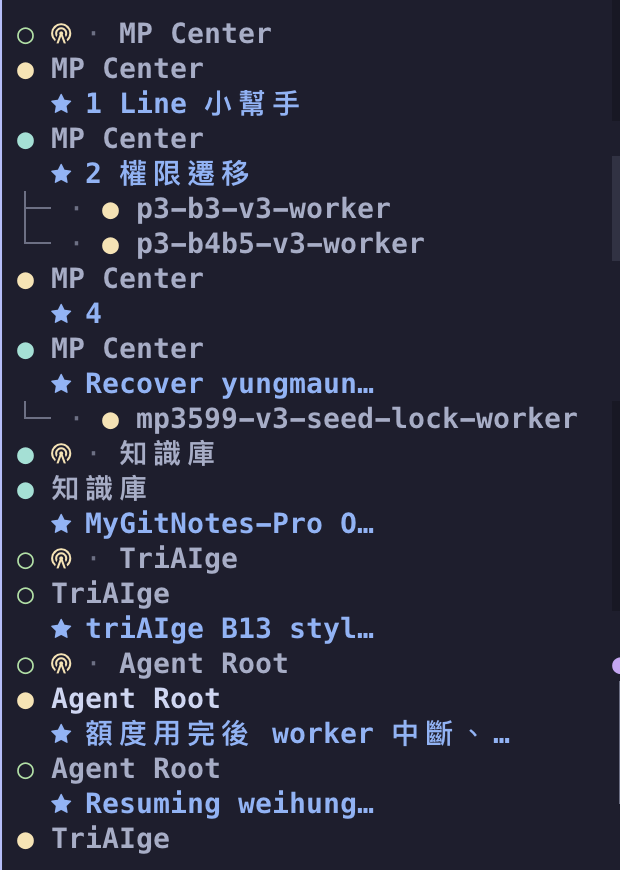
Net view in the sidebar
Section titled “Net view in the sidebar”The plugin in herdr-plugin/ turns the sidebar’s Agents list into the net.
It lists the head tower’s workspace first (once the head tower exists), then in each workspace the tower, each tab’s main agent and members, and every subagent right under the session that launched it, even in a worktree workspace.
The view is on whenever the Herdr server starts, and one key switches it off and on again.
It needs Herdr 0.9.5 or newer and node.
Install it from GitHub, or link a checkout:
herdr plugin install wayne930242/pi-straw-boss/herdr-plugin# orherdr plugin link /path/to/pi-straw-boss/herdr-pluginBind a key in Herdr’s config.toml, then run herdr server reload-config:
[[keys.command]]key = "prefix+alt+n"type = "plugin_action"command = "wayne930242.straw-boss.net"description = "toggle the straw net view"On Windows the action is wayne930242.straw-boss.net-windows.
herdr plugin unlink wayne930242.straw-boss removes the plugin.
pi-straw-boss writes the sort key (sb_order), a role label (sb_mark), and, on subagents, a tree branch (sb_indent) and the subagent’s name (sb_name), which your own sidebar rows can use too.
sb_mark is one glyph per kind, so the sidebar tells them apart; the integrator’s is a code-fork and the watchdog’s a dog.
See Sidebar net view for the tokens and a rows snippet.
Leftover worktree panes
Section titled “Leftover worktree panes”The plugin in herdr-reaper/ cleans up after agents that ran in worktree workspaces.
- Panes. In a workspace whose folder is a linked git worktree, it closes the pane of an agent that has exited once the pane’s shell is idle, and never the focused pane. Herdr then closes the tab and the workspace.
- Checkouts. It removes the workspace’s checkout when
git statusis clean and nothing else uses it. Git-ignored files (.env,node_modules, caches, local databases) do not make a checkout dirty, so they are deleted with it. The branch always stays, and so does a dirty checkout, with the reason in the plugin log. - Kept. A worktree pi-herdr-agents created stays until its parent session removes it with
worktree_remove(or the parent has been silent for 72 hours), and so does a checkout a process of yours works in. A checkout with initialized submodules is removed only when no commit can be lost. - Main-checkout workspaces. A plain shell workspace Herdr opened for the main checkout, to group the worktrees under, is closed once no worktree workspace of that repository is left and it holds only idle shells.
- Pins. A pinned workspace is never reaped and its checkout is never removed. Renaming a workspace pins it at once, and the
pinaction toggles the pin.
It sweeps every 10 minutes and a minute after an agent exits, and the reap-now action sweeps at once.
Every close, removal, skip, and pin is a line in the plugin log (herdr plugin log list --plugin wayne930242.straw-boss-reaper).
It needs Herdr 0.9.3 or newer, git, and node 18 or newer, and runs on macOS and Linux only: on Windows, Herdr does not report what a pane’s shell is running.
herdr plugin install wayne930242/pi-straw-boss/herdr-reaper[[keys.command]]key = "prefix+i"type = "plugin_action"command = "wayne930242.straw-boss-reaper.pin"description = "pin or unpin the workspace"
[ui.sidebar.spaces]rows = [["state_icon", "workspace", { token = "$pin" }], ["branch", "git_status"]]herdr plugin link /path/to/pi-straw-boss/herdr-reaper links a checkout instead, and herdr plugin unlink wayne930242.straw-boss-reaper removes the plugin.
See Worktree reaper for the rules and the limits.