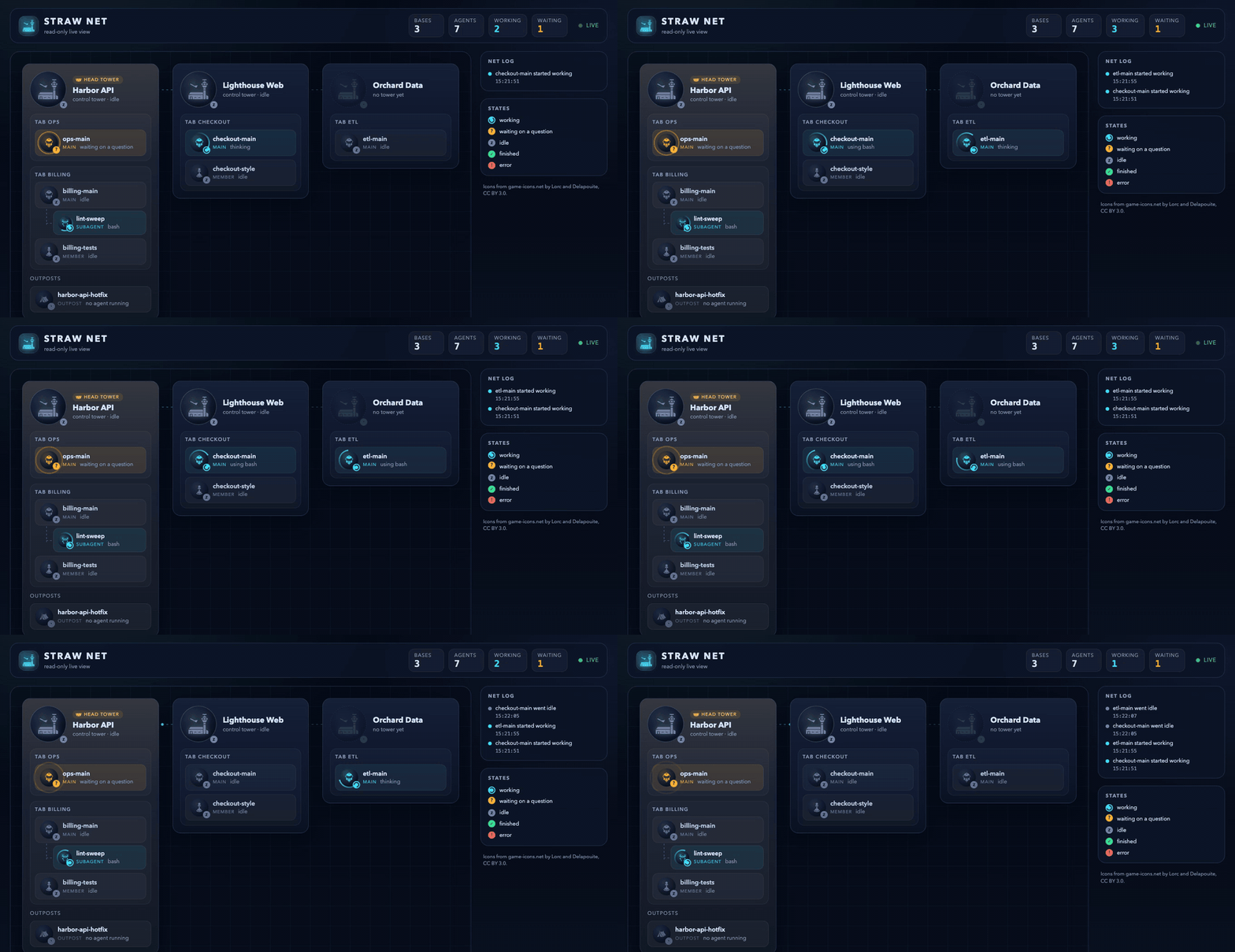
Browser view
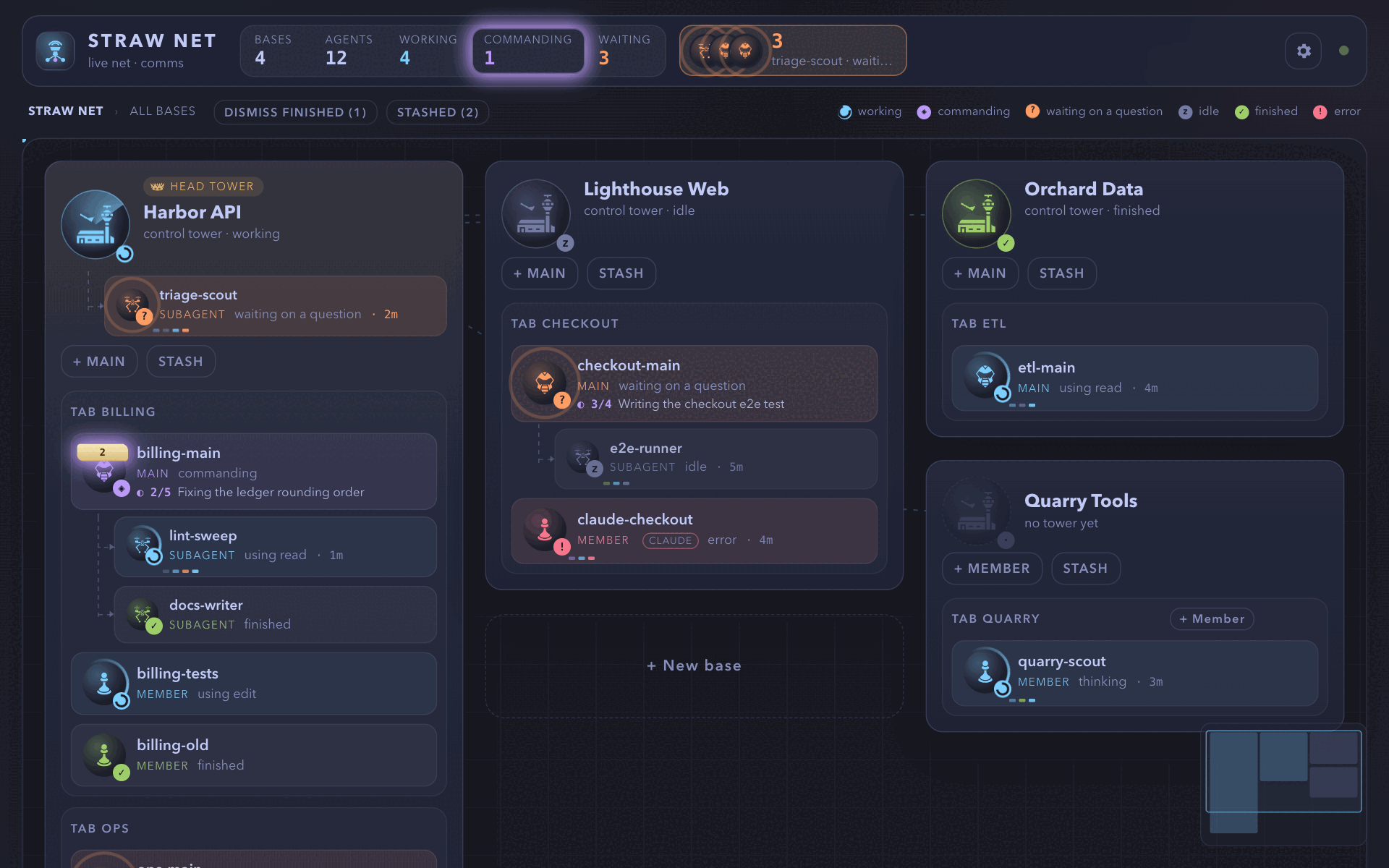
/boss gui shows the whole net in your default browser: a game-style map, live and animated, where you can read any unit’s comms and type into its session.
This section is in six groups: the map, bases, and units; alerts and questions; what a unit’s page shows; closing, opening, and trust; serving the page (remote and Wi-Fi access, the server); and views, themes, phone, and settings.
Map, bases, and units
Section titled “Map, bases, and units”Any session can open it
Section titled “Any session can open it”Any session can open it, in a Herdr workspace or a sub workspace, joined or not. It changes no role and writes no token. A joined session reads the sessions through its tab channel; one that cannot join (a sub workspace) uses a channel of its own (straw-boss/view/<hex of the pane id>, never owner-eligible) that takes no part in any tab. Outside Herdr the extension is inactive, so there is no command.
What it shows
Section titled “What it shows”Each workspace the net reaches is a base: one with a live tower or with sessions that joined. Workspaces with neither, and sessions that did not join, are not shown. A base has its control tower (the head tower wears a crown; a base without a tower shows a dim ghost), each tab’s main agent and members as units, subagents under the session that launched them, the tower’s own under the tower (linked as the dashboard does, wherever they run), and sub workspaces as outposts under their parent.
Details
A unit’s card shows how long it has been in its state (once the server has seen it take that state), its todos (done of total and the task in progress, from rpiv-todo via the session’s bridge), and its last steps as marks along its foot. Under the map, a timeline marks the net’s joins, leaves, and state changes of the last 30 minutes (after zoetrope): waiting and errors on top, work in the middle, the rest below, each named on hover and linking to its unit. The server keeps them, so a reloaded page still has them; a phone folds the strip to its newest event.
The bases pack like masonry in reading order. While the map runs past the window, an overview in the corner shows each base in its state’s colour and scrolls where you click.
States
Section titled “States”States look the same everywhere:
| State | Looks like |
|---|---|
| working | a spinning ring and a spinner badge |
| waiting on a question | an amber ? that hops, with a pulsing ring |
| idle | a dim z |
| finished | a green ✓ |
| error | a red ! |
Details
Changes animate; the page honors prefers-reduced-motion. What the open session is doing (thinking, using a tool, watching a monitor, commanding, waiting for the boss) is not a row in the log: a ring runs round the composer’s box while it works, stands still and amber while it waits for the boss, and a live region says the same in words.
Routes
Section titled “Routes”| View | Route |
|---|---|
| The map | /<token>/ |
| A base | /<token>/w/<workspace id> |
| A unit | /<token>/w/<workspace id>/s/<session key>, optionally with ?at=<entry id> to open its comms at one entry |
Details
Links are real links (middle-click and copy-link work); a plain click, Back, and Forward change the view without reloading, and Escape goes up one level. The Straw Net title in the header goes back to the map. A deep link loads straight into its view.
A base, zoomed in
Section titled “A base, zoomed in”The workspace route draws the base large on the map’s grid: its control tower, each tab as a squad of unit tokens with the same icons and state badges, subagents tethered under the unit or the tower that launched them, outposts, and the workspace’s other pi panes as unaligned units (outside the net, grey, with a dashed ring). Each unit shows its last assistant line, read from the end of its session file. Entering a base zooms out of its spot on the map.
A unit’s comms
Section titled “A unit’s comms”The session route shows the session’s chat as a comms log, with the unit’s dossier in a side column (portrait, role, state, model, context use, directory, base, squad, launcher, dispatched subagents). Its Terminal button opens the unit’s terminal mirror as a tile beside the log.
The log
Section titled “The log”Your messages are gold on the right; the unit’s transmissions are on the left with its icon. Each tool call is a collapsed action card with a state badge (running, done, failed), thinking is folded behind its length, and compactions are dividers. An assistant message’s header names the unit’s role (tower, main agent, member, subagent) with the model and the time, not the session’s name, which the page header already shows; a relayed message still names its sender.
Details
New entries appear when pi writes them; text still being streamed is not in the file yet, so it shows at the end of the reply. The log opens at the newest entry and stays pinned there. Scrolled up, it stays put and a floating button (jump to latest, or N new once entries arrived) scrolls to the end and pins it again. Older pages load as you scroll up; at most 600 entries stay in the page.
Terminal mirror
Section titled “Terminal mirror”The Terminal button opens a live mirror of the unit’s pane beside the log. The server sends only colours and attributes, the page draws the rows as text, and the mirror refreshes within a second while the pane changes.
Details
The tile shows what the unit’s pane shows, with colours and attributes, updated within a second while it changes (at most 4 reads a second, shared by every page that shows it, and none while no page does). The server sends only colour and attribute escapes, and the page builds the rows from text. Fit width scales the tile and scrolls to the bottom, where pi’s editor is; otherwise it keeps its size and scrolls sideways, as on a phone. While the session waits for a secret (secret_drop) nothing is read and the tile says so. A tile pauses 5 s after its browser tab is hidden and resumes when it shows. A read-only question panel offers Show terminal too. On a phone the mirror is display only: typing or tapping in it sends nothing.
Key pad
Section titled “Key pad”Under the mirror, the key pad sends one key per tap: esc, tab, ⇧tab, the arrows, enter, space, ⌫, home, end, pgup, pgdn, and 1–9 (folded away). It has no letters, /, Ctrl, or Alt, and the server refuses them as keys.
Details
- It works only while the tile shows the terminal live (a frame in the last 3 s), at most 8 keys a second.
- While the session waits for a secret, or on a question its panel answers, only Escape works. A paired device likewise sends only Escape, and no prompt, while a
link_requestis open. - Before enter the server asks the session what Enter would submit. It asks to confirm first for a command that ends or replaces the session (
/reload,/new, …, recalled from history too), another/or!command, or an editor it could not read. A second Escape within a second on an idle session, which opens pi’s tree (or fork), asks too. - A confirm says why in the page’s own words, chosen by the server’s
confirmtoken (gui/confirmwords.ts; the server’s English only for a token the page does not know), above two buttons of one height: the one that sends carries its label (Send Enter) on a fill, and Cancel is outlined and has the focus. - The pad’s buttons join the same write queue as typed keys: a press while a write is on its way waits its turn, and the buttons stay enabled meanwhile. Escape goes to the pane, not to the page.
Typing into the mirror
Section titled “Typing into the mirror”On a desktop (a fine pointer) a click into the mirror gives it the keyboard until a click elsewhere; a drag that selects text to copy does not, and switching the session view to its terminal gives it once. Keys land in an invisible text box by the mirror’s corner, so an input method shows its candidates there.
Details
On a phone nothing takes the keyboard by itself, because a tap into a pane opens no soft keyboard. The terminal’s Keyboard button (鍵盤) focuses the same text box and opens the soft keyboard (a second tap, or leaving the terminal, closes it). What it types goes out as text (an input method’s composition as one write when it ends), with Backspace and Enter read from the soft keyboard’s beforeinput where it sends no key for them. Switching to the terminal also makes the composer’s box let go of the focus, so keys never land in the hidden chat.
What goes, all on the same keys endpoint under the same guards:
- the pad’s keys by their own key (arrows, Enter, Escape, Tab, Shift+Tab, Backspace, Home, End, Page Up, Page Down), and Delete as its sequence;
- Ctrl or Alt with a letter, Alt+Enter, Alt+Backspace, and Ctrl or Alt with ← or →, as Herdr names them (the letter from the key’s position, since Alt on a Mac types å for A). Ctrl+Z never goes: pi would stop in the background, where nothing here brings it back. Ctrl+D asks first (it leaves pi on an empty editor), and so does a second Ctrl+C within a second (pi leaves on the second). ⌘ stays the browser’s, and so do Ctrl+V and Ctrl+C on a selection off a Mac;
- characters,
/and!and an input method’s text included, as typed text ({text}): one raw write of 1 to 64 printable characters, so no line break, tab, or escape sequence rides along and Enter still comes alone and asks first; - a paste as one paste (
{paste}): up to 4,000 characters with line breaks and tabs but no other control character, which the server wraps in the terminal’s bracketed-paste markers, so pi takes it as a paste and a line break in it submits nothing.
Writes go one at a time, at most one every 130 ms, under the same 8 a second. Characters typed meanwhile join the next write, a held key repeats only into an empty queue (never Enter, Escape, Tab, or a chord), and a refusal or a confirm drops what was still queued.
The composer
Section titled “The composer”Under the log, the composer types into the unit’s terminal through Herdr, as if typed there:
- Send (Enter; Shift+Enter adds a line; off while the box is empty) sends a prompt when the unit is idle and a steering message while it works;
- After this (Alt+Enter, shown while it works) queues one for when the current task is done;
- Stop sends Escape after a confirm.
Details
While the box holds only / and a name being typed, a menu above it lists the session’s matching commands (extension commands, prompt templates, and skills, as its own pi lists them; pi’s built-in commands are not listed): ↑ and ↓ move, Enter, Tab, or a click puts /name in the box, and Escape closes it. The session’s dialog bridge answers the list, so it is the session’s own set, and the menu shows nothing when it does not answer within a second.
A leading / or ! runs a pi or shell command; commands that end or replace the session (/quit, /exit, /new, /resume, /fork, /clone, /import, /reload) ask first. Text lands after anything still unsent in the terminal’s editor and is submitted with it. The box clears only once Herdr confirmed the input, keeping anything typed meanwhile; a send that was not confirmed is never repeated (check the terminal). What the page could not say when the answer came (you were on another session, or the page reloaded) is kept and shown when you come back: why a send was refused, that it was not confirmed, or, if you edited text that had already been sent, that the original already went.
The box is disabled, with the reason, while the stream is down, the session is gone, or it waits on a dialog (answer that in the panel above it when it can be answered there, else in the terminal). A closed channel takes no typing: the box says why (“This session is no longer live; its history stays readable.”), the comms head shows “channel closed”, and the server refuses input and keys to it (409 not_live). A channel is closed when its session left the net, or when it is a finished subagent that no pane runs pi for any more (its pane is gone or back at a shell); a finished subagent whose pi still runs (an interactive one, not auto-exited) keeps its composer, on a paired device’s page as on this computer’s. Other subagents are typed into directly, like any session.
Ctrl+C and Ctrl+D are never sent from the browser. On a touch screen Enter adds a line and Send sends; drafts survive a reload. Markdown is rendered into DOM nodes, never as HTML; only http, https, and mailto links are links; block quotes and lists nest at most 16 deep, and deeper levels stay text.
Alerts and questions
Section titled “Alerts and questions”Alerts and panels
Section titled “Alerts and panels”flowchart TD
q["A unit waits on<br/>a question or dialog"] --> a["Alert in the header queue<br/>(questions first)"]
a --> d["You open it: a dialog"]
d --> s["Answer"]
d --> l["Later: back in the queue"]
d --> o["Open comms"]
f["A unit fails or<br/>a subagent finishes"] --> n["Notice under the<br/>Notices button"]
Only a unit that needs an answer raises an alert. Alerts queue in the header and never open by themselves: you open one as a dialog, then answer it, put it back with Later, or jump to the unit’s comms with Open comms. A failure or a finished subagent is a notice: it waits apart, under the Notices button, and never takes focus.
Details
Only a unit that needs you to answer raises the prominent alert: one waiting on a question or a dialog (mark waiting, or a pending dialog). A unit that fails (mark error, or a monitor that failed or went quiet) and a subagent that finishes are notices: they never take the header’s alert, queue a dialog, or steal focus. An alert never opens anything by itself: it joins the queue in the header (questions first, then notices, oldest first in each), and leaves it again when the unit moves on.
The header’s alert, Space, and the dialogs’ queue count hold questions only; notices wait under a Notices button beside it, shown only when there is one and tinted red while one of them is a failure. A notice raised before the page opened is not news. You open alerts from the queue or by clicking a unit that waits; they open as dialogs in the dock over the side column.
A second dialog you open stacks on top, with the one beneath peeking out; click the part that peeks out to bring it up (a click that really lands on a control under the strip, such as a settings link, goes to that control). A dialog you are reading is never covered by one you did not open: alerts only queue, and any dialog opened without your action goes beneath the top one, without focus. Closing the top reveals the one beneath, and with none beneath, the next queued question or error.
Later puts the alert back in the queue and opens nothing else; if the unit moved on while its dialog was open, the alert is stale and leaves instead. A dialog is never closed under you: if its unit leaves the net while it is open, the dialog shows gone (“left the net”), without its question or Open comms. The queue is counted the same way in the header (its tooltip) and in every dialog (“Also queued: 1 needs you · 1 finished”): questions and errors need you and are what closing a dialog reveals next; a unit that only finished waits in the queue for you to open it and is counted apart.
Open comms goes to the unit’s comms at the entry the alert was about (read when the alert arrived: the reply with the tool call it waits on, else its last reply), loading older pages when needed, and lights that entry for a moment; the comms log stays there with jump to latest until you go down. It closes the alert without opening the next queued one, so nothing covers the comms you went to. The entry is in the URL (?at=), so Back, Forward, and the link itself land on it again; an entry no longer in the history opens at the newest one, as does opening a unit any other way.
Escape closes the top dialog only, focus returns to where it was, and dialogs are not modal (the page stays usable, nothing traps focus). Documents open as tiles beside the current view instead, sharing its width; a tile that arrives by itself takes no focus, and narrow windows show tiles as tabs. A dialog shows the unit, its last line, and the tool call it waits on, with a link to its comms.
Questions and selectors
Section titled “Questions and selectors”flowchart TD
w["A unit waits on a dialog"] --> p["The page shows it<br/>(alert dialog, session view)"]
p --> a["Send answer"]
a --> k["The package that opened<br/>the dialog settles it"]
k --> e["The terminal dialog closes,<br/>the agent gets the answer once"]
p --> r["Anything else: read-only<br/>with Show terminal"]
When a unit waits on a dialog, the page shows it in the alert dialog and above the session’s composer. Four kinds can be answered from the page: pi-robot-hand’s selector, rpiv’s questionnaires, pi-code’s hook gate, and an extension’s own select or confirm. Send answer goes to the package that opened the dialog, which settles it as a terminal answer would, so the agent gets the answer once. Everything else stays read-only, and secret_drop is never answerable from a page.
Details
When a unit waits on a dialog, its alert dialog and its session view (above the composer) show it. Four kinds can be answered from the page: pi-robot-hand’s selector (robot_hand ≥ 0.3.0: its title as written, each choice with where it acts and the terminal’s number, and Copy command, which copies through the browser and answers nothing); @juicesharp/rpiv-ask-user-question’s questionnaires (ask_user_question: one to four questions, each with a header tag, options with descriptions as radio buttons or, when it takes several, checkboxes, “Or type your own answer”, and “Note (optional)”); pi-code’s hook gate (its confirmation before a gated tool call of any tool, such as “Allow bash?”: Allow or Deny); and any extension’s own ctx.ui.select or ctx.ui.confirm (see Any extension’s select and confirm).
Send answer goes to the package that opened the dialog, which settles it exactly as a terminal answer would, so the terminal’s dialog closes and the agent gets the answer once. The panel then says “Answered.”; “It was already answered in the terminal.” when the terminal was first; the owner’s reason when it refused (the dialog stays answerable); or “Not confirmed. Check the terminal” with Check again (which resends the same answer, never a new one) when no confirmation came.
Cancel (next to Send; a 44 px target on a phone, in Standard, Geek, and phone layouts) ends the dialog the way Escape does in the terminal, with nothing picked: rpiv gets {cancel: true} and its tool call ends with its own cancelled result; a ctx.ui select resolves undefined and a confirm false; the link gate and a link approval take it as Deny; pi-robot-hand 0.8.0’s robot_hand gets {cancel: true} with the dialog’s digest, only for a dialog whose pending said cancellable: true (0.7.x says nothing and gets none), and its tool call returns as cancelled without ending the turn. It rides the same answer route as an answer, so the first answer wins and a resend replays, and the card says “Cancelled.” An owner with no cancel path (pi-code’s gate, secret_drop, robot_hand before 0.8.0) gets no button: nothing is sent, no key, no screen read.
Escape on the page still only closes the dialog view; it does not cancel the question. Cancelling is a refusal, so a paired device may cancel wherever it may pick some choice. A dialog whose choices are all hereOnly (the /boss link approval, its confirm and its words select, and the confirms of gui rotate, gui unpair all, server stop and restart) is refused from a paired device with 403 local_only and shows no Cancel there. A link approval of trust, remove, role, rotate, or leave keeps a Deny a paired device may pick, so it may cancel it (which is Deny).
A question is answered from the keyboard alone: a dialog opens with the focus on its first question’s chosen or first option, not on Open comms. Arrows move between options (a single choice selects as the focus moves; a multiple choice only moves, and Space toggles); Tab and Shift+Tab move between questions (after the last one, to its own-words box, its note, and Send); Enter, or Space on a single choice, confirms an option and goes on to the next unanswered question and then to Send, where Enter sends. Down past a question’s last option reaches its own-words box, where Enter does the same and Shift+Enter breaks a line.
While the focus is in a text box the page’s own keys are off, Escape excepted. A choice that acts on this computer (robot_hand’s clipboard) is offered on a paired device’s page too, with the note that says where it acts, and accepted from it. No key is sent and the screen is never read: each session’s dialog bridge (in every pi in Herdr, subagents too) relays the dialogs its packages publish on pi’s event bus to the GUI server’s session over an intercom extension channel only that session may own. The server lets the page answer a dialog only when it is the session’s one open dialog, belongs to one of the session file’s open calls (the owner’s own tool call, or for the hook gate the call it names), and matches what the page showed (dialog id and digest; see Answering pi dialogs).
Everything else stays read-only with the reason and Show terminal, which opens its screen on the page: ask_user (pi-ask-user), several open dialogs (the page says so only when the bridge relays more than one, or when the one it relays names no open call; a session whose last message left several calls unanswered is answerable while its one relayed dialog names one of them), an answer already on its way, a dialog too long to relay, or one that differs from the session file.
secret_drop is never answerable from a page: a secret is entered in the terminal only. pi-intercom identities are self-reported, so a same-user process could pose as the asking session’s bridge, relay a secret dialog under its own key, and receive the value the page seals to it. Until intercom can verify who a bridge is, the bridge does not relay a secret dialog at all (no label, steps, destination, or key leave the session) and refuses any answer to one, and the server takes no value from any request (400 from this computer’s page, 403 from a paired device) and sends none.
The panel is a read-only wait on every page, with no field and no Show terminal (the mirror stays hidden and the key pad Escape-only): this computer’s page says a secret is entered in the terminal only, and a paired device’s page words it as “For security, entering a secret is not supported remotely” (安全考量,遠端不支援); both name the terminal. The sealing code stays in the tree for the day the path comes back; the spec says what blocks it (Answering pi dialogs, “Why a secret is terminal only”).
The secret_drop call itself is still shown in a device’s comms history with its arguments (label, steps, and destination) as any tool call is; the value never is. Beside another open dialog the unit shows only that it waits for a secret. A unit with an open dialog counts as waiting at once; otherwise it is waiting while Herdr reports its pane blocked, which pi reports from the herdr:blocked event. Straw Boss relays rpiv’s rpiv:ask-user:blocked into it, once per open questionnaire, and pi’s own dialogs too (see Blocked dialogs).
The question shown is the newest unanswered call on the session’s current branch (for a hook gate answered among several open calls, the call it gates); a call longer than 256 KB is read from further back in the file (up to 16 MB, shown clipped), and a longer one says it is too long to read.
Any extension’s select and confirm
Section titled “Any extension’s select and confirm”Every extension’s ctx.ui is one object, so Straw Boss wraps select and confirm (and leaves input, editor, and custom alone, since a secret may be typed there). A wrapped call opens pi’s own terminal dialog and relays the same question to the page; the first answer wins and the other side is dismissed. The dialog is never made worse: a call that cannot be relayed is the original call.
Details
Every extension’s ctx.ui is one object, so Straw Boss (in every pi in Herdr, subagents too) replaces its select and confirm and leaves input, editor, and custom alone (a secret may be typed there). A wrapped call opens pi’s own terminal dialog exactly as before and, in the same call, publishes the dialog on pi’s event bus as a dialog-contract v1 owner under straw-boss:ui, so the bridge, hub, and answer route handle it like any owner’s dialog and every existing check applies (one open dialog, the digest, an answer already on its way, secret_drop open, too long).
A select is relayed with its options; a confirm as one dialog whose text is its title, a blank line, and its message, with Yes and No. The first answer wins and the other side is dismissed: an answer from the page aborts the terminal dialog through its signal (combined with the caller’s own) and the extension’s call resolves with that answer (the chosen option, or true for Yes and false for No), once; an answer in the terminal closes the page’s dialog (stale, answered in the terminal).
The dialog is never made worse: a call that cannot be relayed, or whose relay fails to start, is the original call with nothing left behind, and a dialog that throws or rejects passes its error on unchanged.
When it binds. A dialog is relayed only while exactly one tool call is in flight, and binds to that call (the hub needs it among the session file’s open calls, as for pi-code’s gate); the page words it as “opened while {tool} was running”, since it may be unrelated to that call. With no call, two or more, or a secret_drop in flight, it stays in the terminal; so does a call whose tool has a contract owner (robot_hand) when the owner relays nothing. Unicode format characters in the text the page shows (bidi overrides, zero-width marks) are drawn as U+FFFD.
Only the outermost dialog is relayed (input, editor, and custom only count, passing through untouched; the count resets at agent_end and when pi swaps its ui object): a dialog that opens while another is open withdraws the relayed one (the page could not tell which dialog an answer would dismiss) and is not relayed itself. A select over 100 options, or a title and options over 12,000 characters, are not relayed.
Owners win. A dialog with a contract owner (robot_hand, pi-code’s gate) is relayed by its owner, and the intercepted twin on the same tool call is dropped, whichever opened first. ask_user_question opens its questionnaire through ctx.ui.custom, which is not wrapped.
Remote. A paired device answers a select and a confirm as this computer’s page does: the relayed dialog carries confirm: true (told apart by its digest, so a relay cannot pass one off as the other) and every page shows Yes and No. A secret is the exception: no page takes one. Cancel follows the same rule as any choice: a paired device may cancel a select or a confirm unless every one of its choices is hereOnly.
- Lifetime. The wrap marks the
uiobject it wrapped, so several loaded copies of the package wrap it once. Pi replaces the object when it binds a new UI context (a mode change), so the marker is checked at session start and before every tool call and the wrap is put back on the new object; at shutdown the relayed dialogs are closed and the original methods restored. A session without a UI has pi’s shared no-op object, which is never touched.
An answer that needs the terminal opens it
Section titled “An answer that needs the terminal opens it”flowchart TD
a["You answer on the page<br/>with a terminal-bound choice"] --> c["Terminal card opens"]
c --> p["A command in pi's prompt:<br/>Send it or Cancel"]
c --> n["A command in a new pane:<br/>the pane's own screen"]
p --> x["The card closes when<br/>its step is over"]
n --> x
c --> f["Full terminal<br/>(ssh, vim, and the like)"]
Some choices leave the next step in a terminal: robot_hand can put a command in pi’s prompt, or run or type it in a new Herdr pane. When the owner accepts such an answer, the page opens a small terminal card that holds the command, and the card closes when its step is over. Full terminal opens the whole terminal for anything longer.
Details
Some choices leave the next step in a terminal: robot_hand’s Put it in my prompt (the command waits in pi’s prompt for Enter), Type it into a new Herdr pane and Run it in a new Herdr pane (a new pane below pi that shows or runs the command; the pane closes itself and its output returns as a message). A choice says so with an optional next ("terminal" or "pane", a hint like note, not hashed); pi-robot-hand sends none, so its adapter reads it from the labels it shows, and an owner that sends its own keeps it.
When the owner accepts such an answer, the answer route’s reply carries then (from the stored dialog’s choice, never from the request), and the page opens the terminal card for it in every view: one small card that holds the command the answer put there, for a pane the last four rows of its screen, one line with a Hide what I type toggle, and one button: Run (執行) for a command waiting in pi’s prompt, Send Enter for a pane. The card sends what the key pad sends, through the same writes and under the same server checks.
For a command in pi’s prompt the first tap meets the server’s confirm of a command, which the card draws inline as a pair, Send it and Cancel (the page’s words by the server’s token; Cancel takes the focus, so a second or held Enter cannot confirm). A last row that ends in a colon after password, passphrase, passcode, PIN, 密碼, or 口令 turns the line into a password field by itself and says so; the toggle masks by hand, and a hand mask ends with the Enter it answered.
The field sits outside any form and is cleared on send; the Enter that commits an input method’s candidate sends nothing. A card whose attach was refused or failed reattaches from its button (no key goes), at most once a second and doubling to 8 s while it keeps failing, and says it is connecting meanwhile. Rows that only echo the command shown above them (a prompt, then the command) are left out.
A refusal of a key or of the mirror is said in the page’s language by the server’s code (no_mirror, blocked, rate, standing, not_found, and the rest); a code the page does not know shows the server’s own text. The page does this for every accepted answer with a then, on this computer and on a paired device alike; one rule, no robot_hand special case, in one call (openThen, gui/terminalthen.ts) that every view reaches from the answer’s outcome (gui/ask.ts, so the alert dialog, the session view, and Zen alike) and that anything else ending in a terminal can call.
It hands the page one step, {kind: "prompt" | "pane", key, command}, and a view decides only where the card sits: Standard and Geek in the overlay layer’s dock (not modal, a sheet at the bottom on a phone, covered by a dialog that opens over it, closing at once the alert dialog that sent the boss there), Zen as the card mode of its terminal layer (in ink, in the middle of the page, with 「回到禪」 / Back to Zen in the top right corner). A newer answer’s card replaces the one on show.
The card closes when its step is over, by what it sent or what happened to its own pane and never by a unit’s mark: a prompt’s card when its own Enter is taken, a pane’s when the pane ends (an ended frame, 404 or 409 pane_closed); × and Esc close it in Standard, and in Zen the layer’s Esc Esc returns.
Full terminal opens the terminal as it was before the card, for ssh, vim, and the like: Standard’s session terminal mode or the pane’s tile, in Zen the full mode of the same layer (the page’s one terminal, the same mirror, key pad, and keyboard as Standard’s, one attach; while it has the keyboard Esc goes to it, with the focus elsewhere in the layer Esc Esc returns, and nothing else ends it). The layer is never closed by itself: when a pane closes or its grant ends, a prompt’s own Enter is taken, or the unit works again, a quiet line in the layer’s bar says the step is done and the boss goes back with Back to Zen.
Zen’s Open the terminal buttons (a blocked prompt, a read-only dialog) open that full mode directly, armed: the unit’s first work is that step’s end, which the bar says. A tower with no run live shows its sentence on the card instead of rows. Standard is never visited from Zen and the screen that was there (item, companion, or idle) is shown again as it was. The pane is found by the server: the tab’s panes are noted before the answer goes out, and after it is accepted one new pane is granted under an unguessable id, kept with its terminal id (a reused pane id is refused), at most 8 for 6 hours. Which pane depends on the owner.
An owner whose choice says tagged marks the pane it opened with the Herdr pane token sb_answer=<the answer's answerId>; the server grants the new pane in the tab that carries exactly that value (within 3 s) and no other, however new an untagged pane is, and two panes carrying it grant nothing. An owner that does not tag (pi-robot-hand 0.3.x) leaves the server to the timing claim: exactly one new pane that runs no agent and carries no sb_role token within 3 s.
Its residual is that timing is all that ties the pane to the answer: a pane of the same tab that shows alone in that window (a subagent or /boss open split whose pi Herdr has not detected yet, the boss’s own split, another session’s answer) is granted instead, and takes bare keys until Herdr reports its agent (then the grant ends); Herdr’s detection can lag, which was not measured for pi. A tagging owner has no such residual. Two new panes (untagged owner), none, or an unreadable layout grant nothing (then.pane is null; the card says a pane opened in Herdr).
A grant never reaches a pane that runs an agent or carries sb_role, and ends the moment its pane does either: the next key is refused (409 pane_closed), the mirror reads the pane again with every frame and sends none once it is a pi session or a tower, and the grant is dropped with its reader.
POST /api/panes/<grant>/mirror and /keys mirror it (a “bare” reader with no session behind it) and key into it (the pad’s keys, chords, typed text, and paste under the same rate and the live-mirror precondition, without the pi session’s guards, probe, or confirms), for the boss’s page and a paired device as for a session’s terminal keys; a hereOnly choice stays refused for a paired device. Not opened: a read-only dialog (a secret_drop, several dialogs at once, one too long) keeps its Show terminal link and opens nothing by itself, and a “not confirmed” or “another answer is on its way” outcome offers Check again in the panel, which a terminal view would hide.
-
One tap for a prompt. When the choice put a shell command in the session’s prompt (robot_hand places it as
! <command>), the server keeps a one-tap grant for that answer (the answer id, the session, a random nonce of its own, and the MAC of the line! <command>), andthensaysrun: true. The card’s 執行 sends its Enter withrun: <answer id>.Only for that Enter does the server give the session’s bridge the grant’s nonce with the probe, and the bridge answers HMAC-SHA-256(nonce, its prompt line) for a
commanddraft (an Enter with noruncarries no nonce, so no MAC of the draft is ever made for it; the draft itself never leaves, but a listener on the local intercom broker that sees both the nonce and the MAC of that one Enter could still test guesses for a short command). Only when the MAC equals the command’s does the Enter pass thecommandconfirm.A
runEnter never sends a line that is not that command: a prompt that was edited, emptied, or turned into text or an ending command is refused (run_changed, nothing sent) wherever the editor was read; the one case that asks the confirm instead is acommandline from a bridge that sends no MAC (an older one). An ending command (/reload, /quit …) and an unreadable editor still ask, whatever the MAC. One tap covers only!lines without completable tokens.A command with a token pi’s completion menu can open on (a
/path or pi command,~,@,#, a quote, a token starting with., or a trailing space) gets no one tap: a menu can be open with the line unchanged, and for a/token Enter then submits the menu’s pick.The residual: after Tab on a plain word (
ls foo), which no rule can tell from a command word, the menu can be open; a one-tap Enter then fills in the pick and runs nothing, the grant is spent, the card closes as if the command ran, and the changed line waits in the prompt. pi does not tell extensions whether its menu is open, so the probe cannot see it. Its Enter keeps the confirm, andthenhas norun.A grant answers once, whatever it answers, belongs to its session, and expires after 2 minutes; a changed line, another session’s or an unknown/replayed answer id, and a stale grant are refused with
run_changed,run_unknown,run_expired(said in the page’s words), and the next Enter, which carries norun, asks the usual confirm. Only a pane answer, a choice with nonext, or an answer the owner did not accept leaves no grant. Only MACs are kept or logged.
Notices
Section titled “Notices”Notices are read once opened: they have no Later, and closing one does not put it back in the queue. They wait apart from what needs you, under the header’s Notices N button: it opens a list of the finished or failed units, each with its base and last line; a row goes to the unit’s comms and clears it, and Clear all clears every one (questions stay, to be answered).
Details
A finished unit whose pane has closed, and a subagent whose run pi-herdr-agents recorded done (phase: "done" in its subagent-activity file, even while its pane still runs pi), clears itself from the list after its sound and reminder: its parent has the result. The map still shows a finished subagent for ten minutes.
Enlarge
Section titled “Enlarge”An alert dialog’s ⤢ turns the dialog dock into one wide panel in the middle of the window, for a long question; ⤡ puts it back. The choice is kept per browser.
Details
An alert dialog’s ⤢ beside its × turns the dialog dock into one wide panel in the middle of the window (at most 880 px wide, nearly the window’s height), for a long question; ⤡ puts it back. The choice is kept per browser (sb.dialog-wide), so the next dialog opens the same size. A phone has no Enlarge: its dialogs already take the width. Three keys drive the dialogs: Space opens the next alert, as the header’s alert button does, F presses the top dialog’s ⤢ or ⤡, and Escape closes the top dialog. The page leaves a key alone while you type (an input, the composer and its / menu, a terminal’s key sink), with Ctrl, Alt, or ⌘ held, while an input method composes, or while a confirmation, the image viewer, or a popover is open; Space on an answer option, which selects or toggles it, or on a button or link you moved the focus to with the keyboard, keeps its own activation.
A button or link the mouse left focused (the logo after a click) does not hold Space: it still opens the next alert. A key that did nothing (Space with nothing queued, F with no dialog) is not taken, so the page scrolls as usual.
What a unit’s page shows
Section titled “What a unit’s page shows”Documents
Section titled “Documents”A session that shows documents with pi-herdr-doc-review lists them in its dossier under Documents, and a click opens one as a tile beside the current view. An HTML document runs in a sandboxed frame without scripts; a text document renders read only.
Details
A session that shows documents with pi-herdr-doc-review 0.4.0 or newer (show_doc, or a Mini SDD spec that opens on its own) lists them in its dossier under Documents within 2 s, and a parchment badge on a unit’s token counts those still on screen in its terminal (a tower lists them only in its dossier). On that session’s comms a document that arrives opens as a tile beside the log without taking focus, unless four tiles are open already (it never pushes out one you opened); anywhere else (the map, a base, another session) only the badge changes, and a page that opens on a session with documents opens none.
A click in the dossier opens one, and so does open beside on a show_doc card while its document is listed (an older card stays text). An HTML document is a frame sandboxed without scripts: the page’s attribute and the server’s policy both leave it an opaque origin, so it runs no script, cannot read the API or the cookie, and loads only images, stylesheets, and fonts from its own directory. Its links open in a new tab, and a form with action="cgi-bin:pi-answer" answers the session exactly as a Chawan submission does (the owner delivers it): each page view can send once, so Back and submit says “Already sent” and Reload sends again.
Answers travel in the URL of a GET, as in Chawan, and stay in the browser’s history: keep secrets out of document forms. Open in a new tab shows the same sandboxed page. A text document renders read only, as markdown for .md and as plain text otherwise. When the owner reports a new revision a tile that shows reloads, and a hidden one (another tab of tiles) says so and loads when it shows; a document closed in its session, or a session that ended, leaves its tile saying it is no longer listed.
A session lists at most 32 documents; a list too large for the dialog channel is dropped (the dossier says to read them in the terminal), and documents never hold back its dialogs.
A file pasted, dropped, or picked with + in a composer is posted as its bytes to sessions/<key>/upload, under the same origin and CSRF checks as typed input (a paired phone too), at most 20 MB. The server stores it under pi-straw-boss-uploads in the temp directory (folder 700, file 600) with a cleaned name, and the page puts the path into the message where the cursor is, the way a picture pasted into pi’s terminal lands as a temp file path; the session reads it with its own tools. Text pastes as text.
Reminders and sounds
Section titled “Reminders and sounds”Two switches on the settings page (This device), each a labelled button that says On or Off, kept per browser in localStorage: Remind (on by default) and Sound (off by default, so a page that opens makes no noise; Sound is in fact two switches, Sound effects and Background sound, described in the next entry). They act on the alerts a snapshot raises: a unit that turned to waiting on an answer, to error, or that finished.
Details
Reminders are system notifications (a question’s may beep; a failure’s or a finish’s is silent, a quiet notice), raised only while the page is hidden or unfocused, one per alert, tagged by unit, and a click brings the page forward on that unit; a focused page already shows the alert queue. A first press on Remind asks the browser’s permission; until it is granted the switch shows amber, red when the browser blocks it. A batch plays one sound, the most urgent of its marks (waiting, then error, then finished; an error keeps its own clip, which sounds apart from the question’s), from three Kenney CC0 clips bundled as hashed MP3 files and fetched when one first plays.
Sound has a volume from 0 to 100 (60 by default, kept in localStorage as sb.volume) and a Try button under it; each change plays the finished sound. The device’s preferences live in one store; another tab’s Sound switch or Volume applies to the open page at once. The clips play through Web Audio at the volume squared (loudness follows the square, and an iPhone ignores an audio element’s volume). Both follow every snapshot, a hidden page’s included, through their own record of what was heard: the alert queue’s record moves only while the page is shown, so it still queues what arrived while hidden. What was already waiting when the page opened raises neither.
Sound effects and background sound
Section titled “Sound effects and background sound”The settings page’s one Sound switch and Volume became two, each with its own switch and volume under This device: Sound effects (the cues of events: the question, finish, and failure clips of Standard and of a theme, the unit-ready chime, Zen’s bowl and knock) and Background sound (what plays under the page: Zen’s music, Raven’s rain and thunder; the thunder belongs to the weather). Both are off by default and work in Standard, Geek, Zen, and Raven Keep; Zen’s corner menu and its palette carry both too (a switch and two volume steps each).
Details
A volume is 0 to 100 (60 by default) and reaches the page’s audio core as the square, as a gain for its class only; each switch is checked by the sources of its class only, so Effects off silences the cues and leaves the rain, and Background off silences the rain, the thunder, and the music and leaves the cues. Sound effects has a Try button and plays the finished clip when it is turned on or its volume is released; Background has no sample, because what it plays is already audible.
The old sb.sound and sb.volume are read as the start of both classes while a class has nothing stored of its own (the old on is both on at the old volume, the old off is both off) and are never written, so an older page on the same browser keeps reading its own.
Images
Section titled “Images”A user message’s or tool result’s images (png, jpeg, gif, or webp, as pi stores them in the session file) show as thumbnails in the chat: under the message, or under the tool’s card whether it is open or closed. The page loads each from api/image/<key>/<entry id>/<n>, which reads that one entry and answers with the image’s bytes, cached for a day since an entry never changes; the history itself carries only the count. A thumbnail opens the lightbox: the image fitted to the screen, its own size on a tap, ← → or the arrows for the other images of the same message, and Escape, ×, or a tap beside it to close.
Queued messages
Section titled “Queued messages”flowchart TD
t["You type while the agent works"] --> q["pi's queue:<br/>steer or follow-up"]
q --> b["Dimmed bubbles under the chat"]
b --> e["Edit: take the whole queue<br/>back into the composer"]
q --> n["A turn takes them"]
What is typed while the agent works waits in pi’s queue: a steer reaches the agent at its next turn, a follow-up when the run ends. The session view shows them as dimmed bubbles under the chat until a turn takes them, and Edit takes the whole queue back into the composer. Everything below is how the take-back stays safe.
Details
What is typed while the agent works waits in pi’s queue: a steer reaches the agent at its next turn, a follow-up when the run ends. The session view shows them under the chat as dimmed bubbles, labelled steer or follow-up, until a turn takes them. pi tells extensions only whether messages wait, so each session’s dialog bridge keeps what it saw arrive and drops one when its user message starts (the one with the same text, else the oldest); a queue pi emptied another way (Esc, its dequeue key) clears at the bridge’s next check, within 2 s.
The bridge relays the five oldest, each cut to 200 characters, with its dialogs. Each queued row shows at most three lines, cut with an ellipsis; a row the clamp cuts opens to its full text on a click, Enter or Space, and closes again. Edit (one button under the queue, with a hint that all queued messages come back as one text and one already delivered cannot be recalled) takes the whole queue back into the composer.
It is pi’s own dequeue key (app.message.dequeue): Alt+Up, but Alt+Q where pi uses its Windows keybindings (Windows, and Linux under WSL), or what the user’s keybindings.json binds it to. pi lets an extension read its live keybindings but not run the action, so the session’s bridge, which runs inside pi, names the key: the first of pi’s live bindings for it that the server will press (one Alt or Ctrl chord, never Ctrl+C, Ctrl+D, or Ctrl+Z); where the live manager lacks the id, <agent dir>/keybindings.json read as pi reads it, with an invalid value dropped whole, else the platform’s default. The server checks it against the same list and sends it.
The key clears every queue and puts the steering messages, then the follow-ups, joined by a blank line, in front of whatever pi’s editor held. The page makes an id for each take-back (kept in the tab’s sessionStorage until an answer settles it) and posts it to POST …/sessions/<key>/dequeue (from this computer’s page and from a paired device alike, with no mirror, as typing needs none).
The server asks the session’s bridge first (is anything queued, what does the editor hold, what does the bridge’s own mirror say is queued), sends that key to the pane only when something is (after looking at the pane once more, so a session that changed meanwhile gets no key), then asks again (it waits up to 1.5 s for the queue to be gone, reads the editor, checks that what stands in front of the draft is exactly the mirror’s messages, steering ones first, then follow-ups, puts the draft back, and hands over only the messages).
The terminal’s draft never leaves the session: anything that is not exactly the mirror’s messages in front of the draft (text typed in the terminal between begin and the key, a message pi expanded such as a /template or /skill:, an extension that rewrote it) is refused as changed, and the messages stay in pi’s editor with the draft. pi’s own restore forgets the content of a pasted block in the draft (only its marker stays); then the bridge sets the editor to the messages and the whole draft, the paste’s content back in place.
The hub tells finish its deadline (2.5 s from the request, this machine’s clock) and waits 4 s; past the deadline minus 0.3 s the bridge clears nothing, so the messages stay in pi’s editor and the answer is not_cleared. The messages handed over stay kept in the bridge for ten minutes under the take-back’s id: the same id asked again (the answer was lost: the page left, the network dropped, the page reloaded) gets them without a key, so pressing Edit again fetches them.
The page puts the reply in front of what its box holds, or, when its composer is gone, in front of the session’s stored draft (with a note for the composer that comes back), so nothing depends on a composer being mounted; pi’s editor keeps its own draft and no longer holds the messages, so sending from the page does not duplicate them.
An empty queue sends no key ({empty: true}, “nothing is queued any more”), a queue delivered between the check and the key gives the same answer, and a press while a dialog waits is refused like any key but Escape, and from a paired device while a link_request is open (403 local_only, checked again right before the key).
Refusals that leave the messages in pi’s editor say so: pi’s dequeue key is bound only to keys the page will not send (no_key, nothing sent), pi did not take its queue back (the message names the key that went, which may not be its dequeue key; an older bridge names none, and the server then sends its platform’s default), the editor changed meanwhile, the text is longer than 12,000 bytes, the editor could not be cleared (nothing is handed over while it would stay in the editor too), or the take-back timed out after the key went (stale). A bridge without pull (an older pi-straw-boss in that session) does not answer, and the page says it is unsure. The rows the user opened are remembered per session and per row (the nth of identical rows counts apart).
Monitors
Section titled “Monitors”A session’s background monitors from pi-loop-monitor (MonitorCreate) show under its todos: folded to how many run and how many failed, with the newest running one’s last output line; unfolded to each monitor (newest first, running ones before ended ones, six at most) with its description or command, its state (running, finished, failed, no output and stopped, or stopped), its exit code, its line count, and its last line. Each session’s dialog bridge follows pi-loop-monitor’s events on the session’s bus (monitor:started, monitor:output at most once every 2 s, monitor:finished), strips terminal escapes and control characters, cuts text to 160 characters, and relays the list with its dialogs; an ended monitor stays 15 minutes, as long as pi-loop-monitor keeps its record.
Details
The list is read-only: pi-loop-monitor gives other extensions no way to stop a monitor. A monitor that fails (exit code other than 0) or goes quiet (stopped by its inactivity timeout) raises an error notice of its own, apart from its unit’s state (it goes under Notices, not the header’s alert): its dialog names the monitor, and Open comms, its chat, its terminal, and a reminder’s click all go to the unit. A monitor that finishes or is stopped raises nothing. The alert leaves the queue when the session stops listing the monitor.
Commanding
Section titled “Commanding”A unit that is itself idle while a subagent of it is working, waiting, or commanding, or while one of its monitors runs, shows a mark of its own, commanding (zh-TW 指揮中), instead of idle. Its own state wins: working and waiting stay as they are, and finished subagents count for nothing. This holds for a main agent, a member, a tower, or any unit that has subagents or monitors, in the tower’s dashboard and in the browser view (the server decides; a monitor also keeps the note “watching a monitor”, in red).
Details
It has its own colour (violet), glyph (◈, a diamond) and a breathing glow on the unit’s plate on the map, in the dossier, on the squad’s tokens, on the comms head, and on the HUD’s Commanding figure (still under prefers-reduced-motion and after the page has rested), and a line in the legend. A base or squad that holds a commanding unit rolls it up as working (its subagents work anyway; a unit that only watches a monitor makes its base working); the HUD and the tally count each mark on its own, so Working does not include Commanding.
The alert queue treats commanding like working: it raises nothing. A subagent whose run pi-herdr-agents recorded done but whose pi is still alive with a running monitor has not finished: it is not ended, so it shows as commanding (note: watching a monitor) instead of finished, has no Dismiss button, is left out of Dismiss finished (the server refuses to dismiss it too), and raises no finished notice. When the monitor stops and pi is idle it is finished again.
The same holds for any unit, subagent or not, whose pi is alive: marked done by Herdr while a monitor runs, it shows as commanding, not done, and raises no finished notice or done sound until the monitor stops. The tower’s own TUI dashboard has no monitor data (monitors reach only the session that hosts the GUI), so its glyph for such a unit is unchanged.
A session that keeps a todo list with @juicesharp/rpiv-todo shows it above its composer: folded to Todos done/total and the task in progress, unfolded to every task (○ waiting, ◐ in progress, ✓ done; deleted ones are left out). The server reads it from the session file, as it reads the history: the newest rpiv-todo-state entry on the current branch, else the details of the newest todo result (sessions from before those entries), sent with the history’s first page, with every reset, and with each change that adds a snapshot. Terminal mode hides it, since pi’s own widget shows it there.
Closing, opening, and trust
Section titled “Closing, opening, and trust”Closing
Section titled “Closing”flowchart TD
q["Quit on a unit, squad, or base"] --> a["Asks first"]
a --> b["Each agent's bridge is asked<br/>to quit, pane kept"]
b --> r{"Any refusal<br/>or silence?"}
r -->|"yes"| k["Nothing closes"]
r -->|"no"| c["The tab or workspace closes"]
Quit on a unit, squad, or base asks first, then asks each session’s own bridge to quit, as /boss close does. One refusal or silence closes nothing; only when every agent has gone does the tab or workspace close. A finished subagent has Dismiss instead, and a base can be Stashed and popped again.
Details
Quit on the map, on a base, a squad, or a unit (not a subagent: its launcher closes it), and Quit tower under a base’s name for its tower alone, asks first. × only closes dialogs. Quit is also in a unit’s own comms header, desktop and phone alike: the same button as the map’s for that unit (a tower’s is Quit tower), shown only where the map shows one (not for a subagent, a finished subagent’s Dismiss, or a unit the page cannot control), with the same confirmation, request, and refusals; cancelling or a refusal stays in the comms, and a quit that went returns to the unit’s base.
Then it posts close/all for a base (a base’s Quit is checked first as /boss close all is, and refuses with every reason while anything running would be lost), close/tab, or close/unit. A base’s Stash (beside its + Main) asks first and posts close/stash under the base’s label; the HUD’s Stashed (n) lists what is stashed, each with Pop, which posts close/pop and opens it from the server’s session. A paired device may stash and pop as it may quit. Closing is each session’s own: the server asks the session’s bridge to quit it as /boss close does (pi’s shutdown, reason quit, so its tokens clear and a tower’s quit demotes the mains).
The tower the sb server runs (the tower service) has no pi and no bridge to ask: its Quit tower posts the same close/unit, and the server ends the service as close-tower does (the tab closes, the tokens go with sb_tower_quit=<members>, the base’s mains become members); a squad or a base is closed without asking that identity or the pi of a run in the service’s pane (a boss conversation, an event run, a hand run), and the service ends with the tab or the workspace (a run’s pi that is working still refuses a base’s Quit); a stash refuses a base whose tower is the service, since a pop makes no service again and its queue and conversation stay under the old workspace id.
A session that does not answer is told so in the dialog, with the hint that it may run an older pi-straw-boss (/reload it). A unit then closes its own pane from a detached process once pi has exited. Before it quits, the session marks its pane with the token sb_closing (a 10 minute TTL, never cleared by the session): it leaves intercom while pi is still shutting down, and a pane Herdr still lists as a pi with no session would show for those seconds as an unjoined pi that finished, a green card under “outside the net”, so the net leaves a pane with the token out and the closed main goes from its tab to nothing.
For a squad or a base every agent of the net in it (mains, members, and the base’s tower) is asked with its pane kept; one refusal or silence closes nothing, an agent still running after 30 s keeps the squad or base open, and otherwise the tab or workspace closes with what is left in it (shells, subagents).
A finished subagent has Dismiss instead of Quit (it hides it from every page until it leaves the net), and Dismiss finished (n), in the location bar under the HUD, hides every finished subagent on the net at once through the same path (the button shows only while one exists, on this computer’s page and a paired device’s alike). It takes an ally box’s finished subagents too, each by its own key as that row’s Dismiss does (the server’s all never reaches a box, which would hide every team’s finished units there), and counts only those of a live box that lists dismiss; the phone’s left pane has it as well, at the bottom directly above Back to the map, where a thumb reaches both. A page that was showing what it closed goes up to what is left: from a closed base to the map, from a closed squad’s or unit’s comms to its base.
Opening agents
Section titled “Opening agents”flowchart LR
f["Pick a folder"] --> c["create"] --> s["start"] --> j["join"] --> d["deliver"]
+ New base opens a Herdr workspace in a folder you pick, with one member and no tower; + Member and + Main open one more agent in a new tab. The page shows the opening’s steps (create, start, join, and deliver when there is a first message), and the server enforces the same rules as the commands do.
Details
+ New base, the last card on the map, opens a Herdr workspace in a folder you pick with one member in its first tab and no tower: a base is never empty, and a failed open closes the workspace again. A base without a tower takes only members: + Member on the base opens one in a new tab in a picked folder, and on a squad splits one into that squad’s tab, in the folder of its main (or its first pane). Its tower opens by the rules of the tower, never from the page.
A base with a tower takes only mains: + Main opens one in a new tab in a picked folder, and it promotes itself as soon as it joins; the tower’s own comms carry the same + Main in their header (on a phone and a desktop alike), which opens that tile for the tower’s base and goes to the new main’s comms. Each form takes an optional first message, typed into the new agent once it has joined.
The folder is picked in Finder-style columns: shortcuts for home, Desktop, Documents, and the folders the open bases work in; a column for each level of the selected folder, with the arrow keys moving between them (up and down in a column, left and right between columns, Enter to choose); a breadcrumb with back and forward; and New folder, which makes a folder inside the selected one (a plain visible name, no separator, no leading dot, none of the characters Windows refuses; one that exists is just selected) and selects it. The selected folder’s real path is always shown, and the base’s name defaults to the folder’s own name until it is typed over.
While a unit opens, the tile shows a deploy panel in place of the form: the server reports the steps of the opening (create, start, join, and deliver when there is a first message) at open/progress under an id the page sends with the open, the page polls it twice a second, the running step’s clock ticks, and a finished open flashes “unit ready” (with the finished clip when Sound effects is on) before the page goes to the new unit; a failure names the step it failed at and the server’s reason, and Back to the form returns to the form as it was.
The server enforces the same rules (a base counts as having a tower while its tower session is live), keeps the picker inside home and out of hidden folders (a dot hides one everywhere; on Windows also the Hidden or System file attribute, which a fresh profile puts on AppData and the old compatibility junctions such as Application Data, Cookies, My Documents, and the localised Start Menu: they are not listed, not pickable, not made into, and not reached through a path that passes one; the attributes of a listed folder are read with one cmd.exe call (dir /a:h and /a:s) and kept for 10 s, and when the folder cannot be read the request fails with its reason instead of listing on a guess), runs one opening at a time (one lock for the whole server process, so a GUI that stops and starts inside it, or a token rotation, does not let a retry run beside the open still in its join: the retry is told 429 busy), and closes what it created when an opening fails.
An open/base that carries a deploy id is recorded (the workspace, tab and pane it made, its folder and label, and where the first message stands; the last 64 ids) as soon as the workspace exists, so the id outlives a server restart: a repeat with the same id finds that workspace and answers with it, waiting for its pi to join if it has not, and makes no second workspace for the folder.
Herdr reuses the ids of closed workspaces, so a record counts only while its workspace is open, its recorded pane is still there and runs in the recorded folder, and the repeat names the same folder. A pane that reports no folder (Herdr’s cwd is optional, and a Windows pane may report none just after the start) counts only when the recorded workspace id, pane id, and the workspace’s label all still match; anything weaker drops the record, since a wrong workspace is worse than a duplicate. A folder that is reported and differs makes the record stale. A dropped record makes the repeat a new open (every open/base with an id also forgets the records whose workspace is gone).
The first message is kept per id as none (the open had none), pending (never attempted), sending (set just before the call types it) and sent. A repeat types it only from none or pending, which is the case when the server restarted during the join; from sending or sent it never types again. The reply of an open/base that had a message, and a repeat’s reply, carries delivery: sent (typed by this call, or by an earlier one that finished), unknown (an earlier one began to type it and the server cannot tell whether it arrived), or not_sent (the earlier one had a message that was never typed and this call carries none); open/progress carries the same delivery once the open is finished, and a repeat’s deliver step is done in every case, so a finished open never shows a pending step.
A first message that did not arrive (502 prompt_failed, or 503 unavailable for a server that cannot type) leaves the workspace and its joined pi, and keeps the id, so a repeat finds it and makes no second base; an open that throws before its first message is typed (the pi never joined, or a record could not be written) closes the workspace and frees the id. A repeat whose own pi does not join fails at join (502 open_failed) and leaves the workspace and the record, since it made neither: the next repeat waits again.
A record that cannot be written, when the workspace is made or when the message goes to be typed, fails the open with the fixed reason “The opening could not be recorded, so it was not kept.” (at create or at deliver; the cause and its path go to server.log as opening-record-failed, never to the reply), and an open that made the workspace closes it before anything is typed, rather than leaving a retry to make a second one; a repeat that fails so leaves the workspace and the record, which it did not make.
The wait for the new pi to join is 60 s by default; open/base takes an optional joinWaitMs (a whole number of milliseconds, 10000 to 300000; anything else is refused 400 bad_request before anything is made) for a slow computer such as a Windows one, and a pi that has not joined within it fails the open at the join step (502 open_failed, naming the seconds waited). Time a trust question is open does not count against it, as before. open/member and open/main keep the 60 s.
Project trust
Section titled “Project trust”A pi started in a folder with project resources (.pi/settings.json, mcp.json, extensions, skills, prompts, themes, SYSTEM.md, APPEND_SYSTEM.md, or .agents/skills in the folder or an ancestor) stops at pi’s own “Trust project folder?” before it loads anything of the folder, and that prompt is drawn only in the pane’s terminal. Straw Boss registers a project_trust handler in every pi in Herdr (subagents too) that asks the running GUI as well, so a person who uses only the GUI sees an alert instead of an opening that hangs. With no GUI it answers undecided and pi asks as before.
Details
-
When it asks. The handler answers
undecidedat once, leaving pi’s own order intact (a--approveor--no-approveoverride, then the saved decision intrust.json, thendefaultProjectTrust), unless: pi runs in its TUI on a terminal; this is the process’s first runtime (a/new,/resume, or/forkinto another folder is pi’s own prompt); no decision is saved for the folder or a parent (atrust.jsonthat cannot be read counts as a decision: pi reports it);defaultProjectTrustisask; and a GUI that reads trust requests runs for this Herdr (gui.jsoncarriestrust: 1, names this Herdr’s socket, is not stopped, and answers within 1 s).The page only gets the token after the recorded server is shown to be the process that runs: its pid is alive and its start time is the recorded one. On macOS and Linux that is
ps, at once. On Windows the start time is a CIM read of 3.5 to 5 s on a cold cache, so a new pi may wait up to 6 s before the question reaches the GUI (the read starts when pi loads, ifgui.jsonnames a live server that reads trust requests, so it is mostly under way by then; a start time not in within 6 s is unknown and nothing is sent, and pi asks in the terminal). Agui.jsonthat names a dead pid, a stopped server, or none costs no wait and no PowerShell start. -
The channel. The pi has not joined the net yet, so it talks to the server through files in
<state>/trust/(mode 700, files 600): its request<id>.json(its process, pane, role, the folder, what trusting would load, and a digest over the folder and those findings), the server’s<id>.answer.json, and the pi’s<id>.result.json(which side answered), all written by rename. On Windows the folder must lie inside the user’s profile (see Windows); elsewhere pi asks in its terminal. The server lists a request only while its Herdr is its own, its process lives, and Herdr lists its pane; a request whose process ended is removed. A file that is a link, someone else’s, too large, or whose digest does not match its findings is not read. -
The race. pi’s startup prompt cannot be dismissed once drawn, so the terminal prints three lines (the folder, “The question is in the Straw Boss window.”, “Press any key to answer here instead.”) and reads one key. A GUI answer is returned to pi as the decision (pi’s prompt never shows); a key hands over to pi’s own prompt with all its options, and the alert closes as answered in the terminal; no server answering for 15 s hands over the same way. A
SIGINTorSIGTERMwhile waiting removes the request. Nothing times out: an agent should not trust or distrust a folder because nobody looked. -
The alert. One per folder and digest, however many agents wait on it, ranked as a question (it counts in the HUD, Space opens it, and the reminder and sound are the waiting ones). It names the folder and where the agents run, says that trusting loads the folder’s settings, extensions, skills, prompts, themes, and MCP servers and installs the packages its settings name (extensions and MCP servers run as programs on this computer), lists what the folder holds (folded past five items), and offers Trust (saved for the folder in
trust.json), Trust this time, and Don’t trust (this process only, so the next agent asks again). pi’s “trust the parent folder” stays in the terminal. -
Who may answer.
POST /<token>/api/trust/answer {id, digest, choice, answerId}under the page’s usual checks (origin,Sec-Fetch-Site, CSRF, 64 KB): this computer’s page, and a paired device on the remote listener as for a relayed confirm; a Straw Link peer never. The answer must carry the request’s digest, so it is for exactly what was shown; nothing from the page is a path. One answer is taken per request (busyfor another; the same answer sent again hears its outcome), written to every request of the folder and digest, and the reply isaccepted(a pi took it),stale(the terminal or the end of the pi came first), orunknown(no result in 5 s; Check again looks again). -
Openings. A new pi that waits on the question has not joined, so every wait for a new pi (the page’s opens,
boss_open_main, a tower’s start, a pop) stops counting while its pane has a request, and fails after ten minutes of it with “No trust decision forwithin 10 minutes”, closing what it created. The deploy panel gets a trust step between start and join that holds the same three choices inline; that page’s alert queue then does not open a second dialog for it, while a paired device or another tab still gets the alert, and the panel’s 120 s give-up does not count that time. -
Desk mode and the team profile. Nothing more is needed: the desk window is this computer’s page, and every pane on the desk stack runs the handler. Leave
defaultProjectTrustatask, so the person is asked once per new folder and Trust remembers it (alwayswould load any cloned repository’s extensions with no question;neverwould drop a team repository’s own.agents/skills).
Serving the page
Section titled “Serving the page”The server
Section titled “The server”The server runs in one session at a time, the one that opened it or a survivor that took it over (see One server per machine), on 127.0.0.1 with two random free ports: the local listener, for this computer’s browser, and the remote listener, the only target tailscale serve is pointed at. Which request is local is decided by the listener it arrived on, not by what it says about itself: a request on the remote listener is remote whatever its Host or headers say, and the local listener lets in only a request with Host: 127.0.0.1:<port> and none of the forwarding headers tailscale serve adds (X-Forwarded-*, Tailscale-*, Forwarded, Via), and refuses the rest with 403 (a second guard).
Details
Both listeners run the same handler. Every URL starts with a random token (http://127.0.0.1:<port>/<token>/); a request without it or with another Host header is refused with 403, so other local pages cannot read the net. The only writes are POSTs under /<token>/api/sessions/<key>/: input; keys, which takes one key pad key from a page that shows that terminal live, or Stop’s Escape; commands, which asks the session’s bridge for the commands that match a typed /name and calls no Herdr method; answer, which carries a dialog’s answer to its owner and sends no key; and mirror, which shows the pane’s screen on the page’s own stream. Only this computer’s page may also send (403 from a paired device) server/stop, remote/pair (a new one-time pairing code: pairing is the desktop’s), remote/on, remote/off, remote/devices, remote/unpair, remote/unpair-all, and /<token>/api/dismiss (one finished subagent, or all). Each needs the page’s own Origin, Sec-Fetch-Site: same-origin when sent, a JSON body of at most 64 KB, and the CSRF secret written into the page; for input, keys, and answer the server also asks Herdr right then that the pane still runs pi on that session’s file (a mirror checks it before its first read and every 2 s, and starts afresh when the session moved to another pane).
Typed text is never logged. The page is a built static bundle; any route answers the same page, which carries a <base href> so it loads from any depth. The stream (/<token>/events) names itself first (hello, a random id the page attaches terminal mirrors to; a server that has not read the net yet names it after its first reading), then sends the full snapshot on connect and on every change, a ping every 15 s, and a problem event when Herdr or intercom cannot be read; events?watch=<session key> adds that session’s history, and events?watch=w:<workspace id> the last line of each unit there.
/<token>/api/history/<key> and /<token>/api/entry/<key>/<entry id> page through a session and fetch one entry in full (capped at 1 MB). Documents are served by capability, a random 128-bit value the server gives each listed document, never by path: /<token>/doc/<cap>/ is an HTML document (at most 2 MB) with each cgi-bin:pi-answer form pointed at a one-time nonce (30 minutes, bound to that document), /<token>/doc/<cap>/<file> an image, stylesheet, or font under the document’s own directory (at most 8 MB, no .., no symlink out of it), /<token>/doc/<cap>/answer/<nonce> one form answer (at most 64 fields, 16 KB of query, 12 KB of answer, no control characters other than tab and line breaks), and /<token>/api/doc/<cap> a text document as JSON.
Only documents a session lists now are served. Every /doc/ response carries a CSP sandbox without allow-scripts or allow-same-origin, and its sources name the server’s origin (WebKit does not match 'self' in a sandboxed document); the app may frame only its own pages and sends Cross-Origin-Opener-Policy: same-origin. The rewrite also drops a document’s own <base>, referrer policy, and its buttons’ formaction, formmethod, formtarget; that is a best effort on HTML text, and the sandbox and policy are what hold.
While a page listens the net is read every 2 s; with none it is still read every 10 s, so the timeline keeps what happened while a phone slept. The page is installable as an app: the bundle carries manifest.webmanifest (its id, start_url, and scope are ./, so they resolve under the token path), PNG and SVG icons, and apple-touch-icon.png; the page’s policy adds manifest-src 'self' and links the manifest with crossorigin="use-credentials", so a paired device’s cookie goes with it. There is no service worker: every page comes from the running server’s own build.
Session files
Section titled “Session files”The server reads only the session files of units in the net it just read (joined sessions, towers, subagents through their pane or launch script, and the other pi panes of a base); a path never comes from the browser. A file is read only from a pane running pi, only as a .jsonl under pi’s sessions directory (sessions/ in PI_CODING_AGENT_DIR or ~/.pi/agent, symlinks resolved on both sides), and for an intercom session only when it is named for that session, so a net read during /new cannot pair the old session with the next file; a watched session whose file changes re-attaches to the new one.
Details
A file is indexed in 1 MB chunks from the first and last bytes of each line, and only the index stays in memory; entries are read by offset for the page being sent. Indexing, appends, and reads run one at a time in order, so entries pi writes during the first index wait for it, and a read never uses the index of a file that was replaced. A rewritten file or a branch move resets the page. A first page that cannot be read is tried again on the next net reading.
A unit that leaves the net stays readable for ten minutes, with a link to the pane’s new session when there is one. A session file is opened without following a symlink at its last step (O_NOFOLLOW): a file swapped for a link after the net resolved its path is not read. Where the platform has no O_NOFOLLOW (Windows) the link is looked for just before the open, which leaves a short window between the look and the open; a process of the same user that can swap files in pi’s sessions directory can use it to make the GUI show another .jsonl under that directory, and only the user and their paired devices read the result. Sessions stored elsewhere (--session-dir, PI_CODING_AGENT_SESSION_DIR, or pi’s sessionDir setting) show on the map but have no history and cannot be typed into.
Remote access
Section titled “Remote access”sequenceDiagram
participant P as pi session
participant S as sb server
participant T as Tailscale
participant M as Phone
P->>S: /boss gui remote
S->>T: tailscale serve entry (HTTPS 8443)
S-->>P: QR and one-time link
M->>S: scan, open the link
S-->>M: device cookie, paired
/boss gui remote asks the sb server to put the GUI on your tailnet with one tailscale serve entry (HTTPS on port 8443, to the remote listener only, never Funnel). The session shows a QR in a pi overlay; a phone signed in to Tailscale as this machine’s user scans it and gets a device cookie. Every remote request must also carry this machine’s Tailscale identity.
Details
/boss gui remote, from any pi session, asks the sb server to put the GUI on your tailnet: it adds one tailscale serve entry, HTTPS on port 8443 proxying to the server’s remote listener (never Funnel, and never the local port), and the session shows a QR code in a pi overlay, drawn here from the server’s answer, so the QR and its one-time links never reach the server’s log or the model’s conversation. Scan it with a phone signed in to Tailscale as this machine’s user (or, in an installed app, type the short code printed under the QR: see The installed app’s entry below).
In the overlay, c copies a link and o opens one in this computer’s browser (a session in a desk stack, STRAW_BOSS_DESK=1, has no o key and lists none: the shell shows the page itself); every QR, copy, and open is its own one-time link that works once, within ten minutes, and Esc or q closes it. While the overlay is open the session counts as waiting, so input from the browser is refused rather than lost in it. The settings page’s Phone & devices section shows a fresh QR in the page too; it shows only on this computer’s page (127.0.0.1), not on a paired device’s, and not in a desk window (Desk mode in the page).
A paired device gets a session cookie (HttpOnly, Secure, SameSite=Strict, 90 days, scoped to the token path) and stays paired until the desktop unpairs it, the GUI gets a new token (a pairing belongs to the token: a restart keeps it, but a taken port, a missing or corrupt gui-secrets.json, or /boss gui rotate makes a new one and needs a new QR), this machine’s Tailscale identity (host or login) changes, or 90 days pass without a use; every use renews it, and the response then sets the cookie again (the stored expiry moves at most once an hour).
The server keeps only the cookie’s SHA-256, with the device’s name (platform and browser, read from its User-Agent when it paired), when it paired and when it was last used, in paired.json (mode 600) beside gui.json; it survives remote off and on and a restart of the server, but a new GUI token unpairs every device, because their cookies are scoped to the old token’s path and could not connect anyway; the identity and the wish to have remote on stay, the log says devices-cleared, and a phone scans a new QR code (see One GUI per machine).
Every remote request arrives on the remote listener and must also carry this machine’s Tailscale user in Tailscale-User-Login, which tailscale serve sets, and the exact MagicDNS host. Secrets are entered only on a page of the local listener, so a proxy that dropped its forwarding headers, or a serve entry that still points at the local port, cannot turn a remote request into a local one. A document’s own requests (/<token>/doc/…) need that identity and the document’s capability but not the cookie, because Chrome withholds a SameSite=Strict cookie from a sandboxed frame’s requests: on the tailnet, a device of the same Tailscale user that holds a document’s link can read it and answer its form without pairing.
Port 8443 is taken only when it is free or already this server’s, including an entry from before the remote listener that points at this server’s local port: turning remote on (or the page’s Turn on remote access) points it at the remote listener, and if Tailscale does not take the change, remote stays off with “tailscale serve did not take the entry as asked” and nothing is recorded, so a request through the old target is refused 403 by the local listener rather than served as local. An entry that points anywhere else is never touched.
Turning remote off, and starting a server that does not resume remote, remove the old-target entry; a server started with remote wanted on repoints it to the remote listener instead (the same “free or already ours” rule), and removes it only when it stays off. /boss gui remote off (or Turn off remote access in the Phone & devices section of this computer’s settings page) removes only that entry (other serve entries are never touched), ends every remote stream, and forgets that remote was wanted; the paired devices stay paired.
/boss gui stop does not touch it (the entry points at the remote listener, which stops with the GUI), but the end of the server removes the entry for as long as the server is gone, and remote stays wanted: the next server that starts (from /boss gui, cli.mjs up, a restart, an upgrade, or a pi session’s look) turns remote on again by itself, with the same safety checks and without the QR, and when it cannot (Tailscale down, 8443 taken) it says why in cli.mjs status (remote.note) and in the remote_off warning of up, and tries again at the next start.
Unpair: the Phone & devices section of this computer’s settings page lists the paired devices (name, paired, last used) with Unpair for each and Unpair all, which end that device’s open streams at once; a device list is never offered to a paired device. A paired device with terminal access is trusted like the boss’s own keyboard: the page routes refuse it pairing, remote, Wi-Fi, and server management, and its composer and a new session’s first message refuse the matching /boss commands (and /boss gui view <mode>) to prevent slips, but the key pad’s terminal keys are not filtered, so it can type anything pi accepts, ! shell commands included, and the key pad’s Escape can dismiss any open dialog, all-hereOnly ones too; that is a refusal, never an approval.
A device whose Tailscale identity changed, which was unused for 90 days, or whose GUI token was replaced, needs a new QR (or, in an app, a new code). Resuming checks the identity: a new server turns remote on by itself only as the Tailscale identity (host and login) the devices were paired under, which paired.json remembers; as another one (another user or tailnet signed in) it stays off, removes any serve entry it finds, tells why (a warning), and leaves the wish and the old devices as they are, so the next start as the remembered identity turns it on again and tells the same again until then; turning remote on by hand as the new identity (/boss gui remote) is what voids the old devices.
A paired.json that cannot be written (a full disk, a directory without write permission) does not throw out of the request, and the change stays in effect in memory until the server stops (an unpaired device stays unpaired, remote off stays off), but it is reported: Unpair, Unpair all, Turn on and Turn off remote answer 500 save_failed with the reason (the Phone & devices section shows it) and the session shows a warning, because after a restart the revoked device would be paired again or remote would come back. access.saveError holds the raw error. A legacy paired.json counts as wanted only while one of its sessions has not expired.
Remote off keeps remote.json when its entry still exists under another host name (the Tailscale identity changed), so a later off can remove it. It says why and changes nothing when Tailscale is missing, signed out, a tagged node, without MagicDNS, or 8443 serves something else. The layout works on a phone: no sideways scrolling, larger touch targets, safe-area insets, and the composer stays above the on-screen keyboard.
Since 0.26.0 a session on a phone takes the whole screen (‹ goes back to its base, Info opens its dossier full-screen, and a tower’s dossier lists its base’s squads and units on every screen since 0.26.1), its composer fixed at the bottom over the keyboard, and a tile opens over it the same way; the composer puts its box on top with + on Send’s row, its note line taking no room while empty. While a finger holds or flings the comms log, nothing pulls it back to the newest entry. The net log folds away from its heading, and on a phone shows only its two newest entries.
To use it as an app, pair in the browser first and then add it to the home screen: iOS copies the browser’s cookies into the app only once, at install, and after that the two keep separate cookies, so a pairing link (which opens in the browser) never reaches the app; the pairing code typed into the app’s own entry does. On Android an app installed from Chrome shares Chrome’s cookies, but launching it is a navigation from another site, which leaves the SameSite=Strict cookie behind: a page load without the cookie whose Sec-Fetch-Site is not same-origin gets a page that reloads itself once, and that same-origin reload carries the cookie.
The installed app’s entry. An installed app cannot follow a token that changes (a new one comes with a taken port, a lost store, or /boss gui rotate), and on iOS it has a cookie jar of its own that a link opened in Safari never reaches. So the remote listener (only; on the local one /sb-app/ is a wrong token and answers 403) also answers a fixed, token-free path, /sb-app/, and the manifest it serves a remote page has start_url /sb-app/ and scope /; the local page’s manifest is as before.
The entry runs the same identity checks as a page (remote on, the exact MagicDNS host, no Funnel marker, this machine’s Tailscale-User-Login), and its pages hold no token and no secret. A GET with a valid device cookie answers 302 to the current /<token>/ and sets the cookies again; one without it shows a page with eight boxes, one character each, for the pairing code (its own form-action 'self' and Referrer-Policy: same-origin, because a form post from a page under the others’ no-referrer carries Origin: null and was refused; a script served at /sb-app/entry.js under the same strict script-src 'self' moves between the boxes and takes a paste, and without it the boxes are fields c1 to c8 that the server joins, or a single code field), or, for a document load that is not Sec-Fetch-Site: same-origin (Android launching the app, which leaves the SameSite=Strict cookie behind), the same one-time self-reload as a tokened page.
The POST /sb-app/pair takes the code: it must be a form post from the entry’s own page (Origin equal to the https name, Sec-Fetch-Site same-origin when sent, application/x-www-form-urlencoded, at most 1 KB), so a post from another site never reaches the code or counts for anything. The code is 8 characters from a 32-symbol alphabet without I, L, O, and U (40 bits, shown as two groups of four with a space, ABCD EFGH, never with a hyphen; case, full-width letters (NFKC), any space or dash, and look-alikes are forgiven), drawn when /boss gui remote runs (under the QR in its overlay, never in the text the conversation shows) and when the Phone & devices section asks (beside the QR); it works once, within ten minutes, and ends with remote off or an identity change; at most sixteen wait.
After five wrong codes every waiting code is void and the entry answers 429 until this computer asks for a new code (which gives the five tries back), so a device on the tailnet cannot grind through the 40 bits. A pairing made by the code is the same as a scanned one (a device with a name, 90 days, renewed by use), and its response sets the session cookie twice: Path=/<token>/ for the page and Path=/sb-app/ for the entry, each HttpOnly, Secure, SameSite=Strict, so the pairing is never sent to another path on the host; a QR pairing and a renewal set both too.
A document load at a dead token by this machine’s user, or at the current token with no pairing and Sec-Fetch-Site: same-origin, answers 302 to /sb-app/, so an app installed before the entry existed (its start URL is an old tokened address) finds it by itself; any other request gets the refusals as before. The 401 text for everything else says to type the code in an installed app. A restart keeps the token and the pairing, so a paired app goes on by itself; the code is for a first pairing and for a device that a new token unpaired.
Wi-Fi access
Section titled “Wi-Fi access”flowchart TD
on["/boss gui lan"] --> w["Read the risk,<br/>answer y"]
w --> ca["This computer makes its own CA"]
ca --> ph["Each phone installs it once"]
ph --> pr["Pair, approved<br/>on this computer"]
/boss gui lan lets a phone on the same Wi-Fi as this computer open the GUI without Tailscale. It is off until you turn it on, and it stays on across restarts until /boss gui lan off. Tailscale access is unchanged and stays a separate switch; both can be on, and a phone may be paired over each. The terminal speaks English; the pages the phone sees speak English or Traditional Chinese by the browser’s first language.
Details
Read the risk first. Wi-Fi access needs a certificate authority (CA) that this computer makes for itself and that each phone installs once. A phone that trusts the CA accepts anything the CA signs. Whoever copies the CA’s key can pose to that phone as this computer, and as any private-network address (a router’s or a NAS’s 192.168.x.x page), on any Wi-Fi the phone joins, until the certificate is removed from the phone.
The key lives in lan-ca.json, which every program running as you can read, agents you run included, and it can end up in a backup of the agent folder. macOS excludes the file from Time Machine, but Time Machine’s local snapshots may still hold a replaced key for up to a day. The CA is limited by name constraints (below), which hold only where the phone’s software enforces them. So use Wi-Fi access on your phone’s hotspot, or on a Wi-Fi that connects the phone directly to this computer, so no one else is on the network.
The first /boss gui lan shows this warning and makes the CA only after you answer y; the page’s Wi-Fi tab shows the same text before it turns anything on.
What is served
Section titled “What is served”Each eligible address of this computer (private IPv4 only) gets its own listener, 8445 by default. IPv6, the Tailscale address, and link-local and public addresses are never served.
Details
- Each eligible address of this computer gets its own listener (
8445by default, kept inlan.json, because the port is part of an installed app’s origin). - An address is eligible when it is IPv4 in
10/8,172.16/12, or192.168/16, is on a real interface (not loopback, not a tunnel such asutun, WireGuard, or a/31or/32link), and has a sensible prefix. - Never served: IPv6, the Tailscale address, link-local and public addresses.
- VM and container bridges are served, since nothing tells them from Wi-Fi; a layer-2 VPN adapter can be served too. The overlay, the page, and
cli.mjs statuslist every served address with its interface, so you can see it and turn Wi-Fi access off. - Every connection must come from a private address on the served address’s own subnet; anything else is closed before a byte is read.
- The listener tells TLS from plain HTTP by the first byte. TLS gets the GUI; plain HTTP answers only the certificate pages.
- The server watches the interfaces every 5 s: a new address gets a listener, a gone one loses it, and a wake from sleep rebinds all of them.
- A port taken by another program on an address leaves that address unserved with a note;
/boss gui lanmoves the port only then, and an app installed on the old port must be added again.
The certificate
Section titled “The certificate”The CA is made once and kept in lan-ca.json; each served address gets a short-lived server certificate that names only the computer’s .local name and that address. The CA is constrained to private IPv4 names.
Details
lan-ca.jsonholds an ECDSA P-256 CA valid for two years. Each served address gets a 90-day server certificate (kept in memory, renewed under 30 days) that names<computer name>.localand that address, nothing else.- The CA may sign only that name, private IPv4 addresses, no IPv6, no email address, and no URI. If the computer’s name cannot be read, the CA signs addresses only and the QR carries an address.
- Sixty days before it ends,
statusand the page say so; when it has ended, Wi-Fi access turns itself off until you renew it. /boss gui lan resetasks: r makes a new certificate and keeps the pairings (the old one is ending, or the computer was renamed); u also unpairs every Wi-Fi device (the key or a phone may have been stolen). Either way each phone must remove the old certificate and install the new one; removing it is what ends a copy of the old key./boss gui rotateleaves the CA alone.- A corrupt, foreign-owned, linked, or too-open
lan-ca.jsonleaves Wi-Fi access off with a note; nothing makes a new CA behind your back.
Getting the phone to trust it (once per phone)
Section titled “Getting the phone to trust it (once per phone)”Each phone trusts the CA once. The best way is to send the profile (iPhone) or the .crt (Android) from this computer by AirDrop or Quick Share; the certificate page is the fallback.
Details
- Best: send the profile (iPhone) or the
.crt(Android) from this computer by AirDrop or Quick Share. The overlay’s f key writes these public files tolan-ca-files/and shows them; the page’s share buttons download them, one link for each file. Nobody on the Wi-Fi can touch this path, and it needs no check unless the phone asked you to accept a file from an unknown sender. - Otherwise scan the certificate QR, or open
http://<name>.local:8445/sb-ca/, a plain-HTTP page that offers the files and the steps for the phone’s platform. Anyone who controls the Wi-Fi can swap what that page serves, and the page itself shows no fingerprint, because an attacker who swaps the page would print the real one. So the check is on this computer’s screen, which shows the SHA-256 start of the real certificate and where to look on the phone:- iPhone, before Install: the profile’s Contains row says only a certificate, More Details lists exactly one certificate and nothing else, and its SHA-256 starts with the bytes shown.
- Android, after installing: Trusted credentials, User, shows exactly one Straw Boss LAN CA and nothing you did not add, with the same SHA-256.
- Mac: Keychain Access shows exactly one, with the same SHA-256.
- Windows: exactly one Security Warning appears during the import, and its SHA-1 thumbprint matches the one shown. Anything else means remove what was added.
- The profile and the file each hold exactly one certificate, so another count means they were swapped.
- On iPhone, install the profile and then turn the certificate on in Settings, General, About, Certificate Trust Settings. On Android use Chrome; it trusts certificates you install, and Firefox does not by default.
- An Android phone before 12 may not resolve
.local; press i in the overlay to use the address instead. An app installed from an address stops working when the address changes. - The page
/sb-ca/checkshows whether the phone trusts some certificate for this name. It cannot tell this computer’s from an attacker’s.
Pairing, with approval on this computer
Section titled “Pairing, with approval on this computer”The overlay’s QR carries a token-free link that asks the phone to press Pair; a code works once, and a redeemed code only makes a pending device that this computer must approve.
Details
- The overlay’s QR carries a token-free link,
https://<name>.local:8445/sb-app/pair/<code>, which asks the phone to press Pair before it uses the code, so a link preview cannot spend it. A typed code for the installed app is shown only when asked for. - A code works once, within ten minutes, and each surface (one overlay, one page tab) has at most one live code; making a new one voids the one shown before.
- A redeemed code only makes a pending device with a four-digit number shown on the phone. You allow it by typing that number on this computer, in the overlay or in the page’s Wi-Fi tab. Neither prints the number and no button allows a listed request, so a bystander who used a seen code cannot be allowed by reflex. The overlay denies one request with
d(Up and Down mark which when more than one waits; the page’s Deny) or all withn; denying needs no number. Three wrong numbers deny everything pending; two minutes without an answer drops the request; every result is announced in the overlay, the session, the page, and the log. - Typed codes are locked per peer address (five wrong tries) and void after 200 wrong tries from all addresses; the page says when someone seems to be guessing.
- While a
/boss gui lanscreen is open, a paired device (either network) can send only Escape into that session, and each screen takes only Escape for 1.5 s after it opens. A/boss sendinto that session is held to the same mark (the post saysguarded), since a paired device can make another session send it. A phone cannot answer the screen it is looking at. - A request that arrives while no screen is open raises a notice in every pi session and on the page.
- The approval does not stop a swapped certificate: an attacker in the middle relays the real number. The fingerprint check does.
After pairing
Section titled “After pairing”After approval the phone holds a Wi-Fi cookie, set only for the GUI’s paths and kept apart from the remote one. A Wi-Fi device may do what a paired tailnet device may do, nothing more.
Details
-
The cookie is
__Secure-sb_lan(HttpOnly, Secure, SameSite=Strict, 90 days, renewed by use), set for/<token>/and/sb-app/only. Remote and Wi-Fi cookies live on different hosts and are never mixed. -
Allowed devices live in
lan.json, bound to the GUI token: a new token (a taken port, a lost store,/boss gui rotate) unpairs them. They survive Wi-Fi access off and on, restarts, new addresses, and CA renewal. -
A Wi-Fi device may do what a paired tailnet device may do, nothing more. The server, remote, Wi-Fi, and most Straw Link controls stay on this computer’s page.
-
A document opened on a Wi-Fi device needs the device’s cookie for the document itself, and everything the document loads (images, styles, answers) goes through a short-lived ticket in the page’s
<base>, so a leaked link opens nothing. Unpairing, switching Wi-Fi access off, or a new token ends the tickets. -
The settings page’s Phone & devices section on this computer’s page has a Tailscale tab and a Same Wi-Fi tab and one device list for both, each device labelled with its network. The Wi-Fi tab shows the risk and the hotspot advice, turns Wi-Fi access on only when you press its button, and offers the certificate files (one link for each file, labelled by the platform it is for), the fingerprint steps, a pairing QR, a code, the address toggle, the pending requests, and the field for the phone’s number.
Notes and events from the server (a taken port, the firewall, a renamed computer, no address, the certificate ending, a paired or refused device) come with a code and its parameters, and the page words them in English or Traditional Chinese; the PowerShell and macOS commands in a firewall note stay exactly as the server gives them. A note that means a phone cannot connect now (Wi-Fi access held off, a taken port, an ended certificate, a firewall block) is shown as an error; a moved port, a VPN, a certificate that is ending, and the events are only told.
Refused pairing codes from one address are one line with a count and the time of the latest. While a pairing request waits and the Wi-Fi tab is not open, the page’s header says so, and pressing it opens the tab. The tile does not show in a desk window or on a paired device’s page.
-
Straw Link is unchanged: the tailnet join stays Tailscale only, and nothing of the link listens on Wi-Fi.
-
Only the default Herdr’s sb server offers Wi-Fi access; another slot’s server says so.
The installed app’s entry on Wi-Fi. The Wi-Fi listeners also answer the fixed /sb-app/, with the Wi-Fi’s own codes, cookie, and waiting page. A typed Wi-Fi code is shown as ABCD EFGH and entered in the same eight boxes as the Tailscale entry, with the same forgiving reading (case, full-width letters, spaces, any dash, and invisible characters). The entry’s pages send Referrer-Policy: same-origin: under the listener’s usual no-referrer a form post carries Origin: null, which the redeem refuses. An app installed from the name keeps working when the computer’s address changes.
Firewalls. The server never changes a firewall; it reads what it can without elevation and adds a note with the fix.
- macOS: when the application firewall is on and blocks all incoming connections or blocks
node, the note says to allow it in System Settings, Network, Firewall, Options. - Windows: see Windows.
- Linux: no check; allow the subnet to the port, for example
ufw allow from <subnet> to any port 8445 proto tcp. - A full-tunnel VPN that blocks local traffic leaves the address served and unreachable; the note says to allow local network access in the VPN’s settings.
Whether a phone enforces the CA’s name constraints for a certificate you installed is the platforms’ own behavior, and it is to be measured, not assumed. Nothing is measured yet: every platform counts as unmeasured and gets the strong warning. The certificate page, the Same Wi-Fi tab, and the /boss gui lan overlay say plainly that whether the phone limits the certificate has not been verified, and that a copy of the key could pose as any website to it. The table below stays “not measured” until the gate (see the release notes) is run; a platform that passes it will get narrower text.
| Client | OS and browser version | Outside the permitted address | Another .local name |
IPv6 | Ended CA | Another DNS name under the no-name CA (f) | No-name CA’s real leaf | Mail and code-signing leaves (g) |
|---|---|---|---|---|---|---|---|---|
| iPhone, Safari and home-screen app | not measured | not measured | not measured | not measured | not measured | not measured | not measured | not measured |
| Android, Chrome and installed app | not measured | not measured | not measured | not measured | not measured | not measured | not measured | not measured |
| macOS, Safari and Chrome | not measured | not measured | not measured | not measured | not measured | not measured | not measured | not measured |
| Windows, Edge and Chrome | not measured | not measured | not measured | not measured | not measured | not measured | not measured | not measured |
The server panel
Section titled “The server panel”The settings page’s Server section, on this computer’s page only (127.0.0.1; a paired device does not see it, and the server answers it 403 local_only), opens the sb server’s state (live, restarting, or stopped; version; mode; uptime; last error), Restart server (a confirm in place that says the page keeps its address and reconnects by itself, then the server restarts and the page reconnects when it is back, with a note to open /boss gui if it does not: the address changes only when a port was taken) and Show log (the last 200 lines of server.log, which holds no message text or secret). Restarting from the page names the asker “GUI” in the log; the reason is one line of at most 200 characters.
One GUI per machine, served by the sb server
Section titled “One GUI per machine, served by the sb server”The GUI runs in the sb server (The sb server), not in a pi session: the server binds its two loopback listeners (the local one and the remote one) after it has registered its intercom id, and, while Wi-Fi access is on, one more listener per served private address (Wi-Fi access), and /boss gui, /boss gui stop, /boss gui remote, /boss stash, and /boss close all ask the server over its control socket. A pi session hosts nothing, adopts nothing, takes nothing over, and holds no dialog hub, so the page does not depend on which pi lives. The server writes gui.json and records the same port and token in server.json (gui: { port, token, stopped }).
Details
The boss chose to keep the GUI token, the CSRF secret, and the paired devices across restarts. The token and the CSRF secret live in gui-secrets.json (mode 600, written by rename, beside paired.json in the owner-only folder; on Windows covered by the state folder’s ACL; the ACL read-back lists it in the primary slot’s folder only, a secondary slot’s copy inherits the folder’s protection without being read back) with the pair of ports they were bound to.
A restart or an upgrade of the server, a server that starts after a crash or an unclean exit, a reboot, and a start after /boss gui stop bind the recorded ports again (a port the old server is still letting go is waited for up to 5 s) and keep the token, the CSRF secret, and paired.json’s devices: an open page and the desk shell reconnect by themselves, a phone’s tokened start URL and the installed app’s fixed entry go on, and remote access, when it was wanted, comes back with the serve entry pointed at the new remote listener. Both records carry the token before restarting is cleared.
A new token, with every device unpaired (the log says devices-cleared; the identity and the wish stay), comes in three cases: gui-secrets.json is missing, corrupt or stale (one log line, newToken=true why=missing, corrupt or stale; the first start after an upgrade from 0.47 has none; a link or a file another account owns in its place is corrupt; stale is a store whose token is not the one the records name, left behind when a build that ignores the store ran on the ports in between: a downgrade, or a 0.45 host), the listener could not get both of its ports back and moved (why=moved; the remote port counts), and /boss gui rotate (after a confirm; a new token and CSRF secret on the same ports, every phone unpaired, a stopped GUI started, the new address opened; why=rotate).
Then the old token and CSRF secret get 403, a page left open says the address does not work here (a page load at the old address gets the same note as a short HTML 403, in Traditional Chinese when Accept-Language asks for it), and a phone scans a new QR code (an installed app types the pairing code). The risk, accepted by the boss: another account that binds a port in the gap between two servers receives what an open page or the app sends (the token in the URL, the CSRF secret in its requests), and the secrets stay valid when it frees the port.
On the remote port the gap is wider: a clean leave (and a fatal JavaScript error) takes the serve entry down, but a SIGKILL, an out-of-memory kill or a power loss leaves it pointing at the dead port, so a squatter there is sent a paired phone’s requests with the token in the path. What it then gets is more than that phone: with the token it can open this computer’s page on the local port (the local listener admits on the token and a Host header the process sets itself) and read the CSRF secret, which is the full power of the local page (restart, link settings, spawn, secret entry).
Unpairing the phone does not end it; only /boss gui rotate does, and the “port is taken” rule catches only a squatter that still holds a port when the next server starts, not one that let go. /boss gui rotate is the answer to a gap you do not trust. The first server after an upgrade can find a pi session of 0.45 or older still hosting the GUI: it asks that session to hand over, as a newer build always could (server/stop with take; its serve entry goes with it), waits up to 5 s until nothing accepts a connection on its port (it sends the port nothing during that wait), and binds the same port, under a token of its own (the older host never stored one), when it gets it back (only when the process gui.json names runs, and its start time is known and the one gui.json records: nothing is sent to a port whose recorded process is gone, and nothing to one whose process’s start time is not known yet or was not recorded, because on Windows a crashed host’s pid is often another process’s, which may hold the port.
The start time is waited for up to 6 s; when it does not come, the hand-over is skipped and logged as gui-reclaim-skipped, and the server’s GUI moves to another port), so remote access comes back on the server’s listener (the page the older host served stops working: its token is the older listener’s). The server itself is never taken over: a takeover asked of it is answered 409, and the older session then reports the GUI as stale and leaves it alone (only that build’s plain /boss gui stop is taken, as a stop on purpose).
/boss gui is the boss’s own start: it starts the sb server when none runs, starts a GUI that was stopped on purpose, opens the browser, and prints the URL. /boss gui stop stops the GUI listeners only (stopped in gui.json and gui.stopped in server.json); the server goes on running its other services, and a restart keeps the stop, the boss’s own /boss server restart too (it clears only the server’s own stop on purpose, as /boss server and cli.mjs serve do; only /boss gui and cli.mjs up’s gui step start a GUI that was stopped).
No automatic ask starts a GUI that was stopped on purpose: /boss stash and /boss close all say it was stopped and leave it to /boss gui or cli.mjs up. remote.json records the serve entry’s target, the server’s PID, and when that process started while remote access is on (paired.json outlives the server: whether remote is wanted on, the identity, and the devices, which go only with a new GUI token), so the next server removes an entry a crashed one left: a recorded entry counts as stale only when its PID is gone or belongs to a process that started at another time, so a server that really runs keeps its entry.
If the remote port is taken (two servers, or another process) the server gets another free one, which remote.json and the next serve entry then name.
gui.json is a contract
Section titled “gui.json is a contract”Besides the sessions, a program that shows the GUI (the straw-boss-desk shell) reads gui.json in the state directory, $PI_CODING_AGENT_DIR/straw-boss/ (a pi without that variable uses ~/.pi/agent/straw-boss/). It may read port, token, pid, started, stopped, version, herdr, owner, and view; csrf and the rest are for the sessions (trust: 1 tells a pi that the server reads its project trust question, Project trust).
Details
Since the GUI moved into the sb server, pid and started name the sb server, the process that serves the GUI, owner is sb server (pid N), ownerSession is the server’s intercom id, view (optional, standard, geek, or zen, absent when the boss has set no default) is the default view of the GUI (/boss gui view; the record is written again when it changes, also while the GUI is stopped, and a shell that does not know the field ignores it), and stopped means the GUI was stopped on purpose (/boss gui stop) while the server runs on; the whole server stopped on purpose is server.json’s stopped.
The file holds the token, so it is a secret: never log it. The URL is http://127.0.0.1:<port>/<token>/, with the trailing slash. Ready: the record exists, is not stopped, and a GET of the URL answers 200. Moved: a restart, an upgrade, a start after a crash or an unclean exit, a start after /boss gui stop, and a reboot write the record again with the same token and CSRF secret and the same port (D27: the token is kept in gui-secrets.json with the pair of ports it belongs to).
A new token comes with a port that was taken (the remote port counts: one that is taken moves the listener to a new token too), a missing, corrupt or stale gui-secrets.json, a hand-over from a 0.45 host (which never stored one, and leaves a store from before it stale), and the boss’s /boss gui rotate. The old token and CSRF secret then get 403, and both records carry the new token before a reader can see the server as live again. Watch the directory (or read the file every 2 s) and reload when port or token changes, once the new URL answers; a shell that loaded the old URL has no page to keep.
Gone no longer depends on a pi session: a server that went down without a stop is started again by the next pi session’s look (about 6 s while any pi runs), by its supervisor, or by cli.mjs up, which a shell runs at its launch; the states and what a shell does in each are in States for a shell. Every write goes to a temporary file in the same directory (mode 600, created new under a random name) and is renamed into place, so a reader never sees half a file.
While the server restarts, gui.json still names it but has no started: an older build adopts a GUI only when the record has one, so no pi session of 0.45 or older adopts it mid-restart, and the next server writes started again. The record has no schema version: pin the pi-straw-boss version, and a change to these fields reaches you only with a new pin. server.json (beside it) describes the whole stack and is the successor the shell moves to: it may read pid, started, version, herdr, mode, desk, stopped, restarting, lastError, log, and gui: { port, token, stopped }; socket, secret, intercom, and intercomId are for sessions only.
gui.json stays on disk, and is never removed without a note in the release. A session started with STRAW_BOSS_DESK=1 in its environment (the desk shell shows the page itself) prints the URL for /boss gui and opens no browser.
Desk mode in the page and the session
Section titled “Desk mode in the page and the session”Desk mode in the page and the session (STRAW_BOSS_DESK=1; the desk shell starts its Herdr server with it, so everything under it has it, and server.json records desk). A server that runs with the switch puts <meta name="sb-desk" content="1"> beside sb-csrf in the page it serves, and the page, which reads it once at load, leaves out GUI remote access (the settings page’s Phone & devices section) and stash (each base’s Stash button, the HUD’s Stashed button and its list); this holds after every restart, because each server reads the switch from its own environment (up with the switch restarts one that runs without it). Hiding is presentation only: the routes stay, and the URL is the credential either way.
Details
A session in a desk stack prints the URL for /boss gui and opens no browser, and its pairing overlay has no o key. The folder pickers (+ New base, + Member, + Main, and Straw Link’s folder steps) show a Choose… button when the shell’s preload exposes globalThis.strawBossDesk.pickFolder({ defaultPath, title }), which answers a folder path or null: the chosen path goes through the same POST api/dirs as a click on a breadcrumb, so the server stays the judge of it (home only, nothing hidden, and a refusal shows in the picker’s note), and null changes nothing. A browser has no such hook, so no button.
Every session, desk or not, checks 20 s after its start whether Herdr’s pi integration is in place for its agent directory: when Herdr reports an agent in its pane but no agent_session, it warns once, “Herdr’s pi integration is missing for this agent directory, so this session cannot join the net; run herdr integration install pi and restart pi.” (src/integration.ts; a failed listing says nothing).
Background tabs
Section titled “Background tabs”The page treats a stream as dead after 45 s without a message and reconnects with a backoff of 1 s doubling to 30 s (±20 %), giving up after 8 failures until the tab is used again. Coming back (visible, focus, pageshow, online) reconnects at once when the stream is closed or has been quiet for 20 s, and takes a fresh full snapshot instead of replaying what was missed. While disconnected, the map is dimmed and the banner says so with the time of the last update.
Details
A modal overlay (gui/connect.ts) covers the page from the first byte until the stream’s first snapshot, and again whenever the stream is lost: “Connecting…” or “Reconnecting…”, and after the 8 failures the give-up note with Try again. The app root is inert and no click or key reaches the page behind it. A hidden tab pauses its animations, draws only the newest snapshot when it returns, and holds no timer beyond the stall monitor.
The QR encoder
Section titled “The QR encoder”The QR encoder is the package’s own (src/qr.ts), adapted in part from Project Nayuki’s QR Code generator library (MIT, see NOTICE.md); there are still no runtime dependencies.
Motion rests
Section titled “Motion rests”A page left alone costs a phone’s battery in frames, so the animations that never end (the spinning rings, the waiting unit’s ping, the working badge’s spinner, the connection dot’s blink, the packets on the map’s wires) stop after 30 s without input and show a still sign of the same state instead (a frozen ring or spinner, a faint halo for a unit that waits); any touch, key, mouse move, or scroll brings them back. A wire’s packet travels only while one of its two towers works, and a phone’s dossier, which sits under the full-screen comms, is not drawn. With prefers-reduced-motion the page has no such motion and none of this runs.
Views, themes, phone, and settings
Section titled “Views, themes, phone, and settings”Phone layout
Section titled “Phone layout”Phone layout (unreleased; on a screen up to 640 px wide, a desktop is unchanged). The log gets the screen: with a main’s queue of three steers or the tower waiting for the boss, the log is at least 55 % of a 390 × 844 viewport (it was 29 % and 33 %), and the first base starts within 160 px of the top of the map.
Details
The map has no location bar and no unit Quit: a unit’s Quit is only in its comms header; a base’s and a squad’s Quit (the same button, the same confirmation and refusals) are behind a ⋯ on its header, and the header’s own ⋯ holds Dismiss finished and Stashed while one exists. A tower’s comms header is one row (back, name, Info, ⋯) with + Main and Quit tower behind its ⋯, over the Comms | Terminal switch. The boss conversation is one line with a ⋯ for Leave, New, the facts the line cuts, and the event runs’ chips (with only event runs it reads “Event runs · n”).
Queued messages fold to one row, “n queued”, when there are two or more; a tap opens the list and Edit all steers. An assistant’s message has no avatar gutter, a squad’s units are rows with the plate beside the name, and the phone’s left pane names the tower and its state. A ⋯ is a 44 px button that opens a popover (Escape or a tap outside closes it and the focus returns to the button; the arrow keys, Home and End move between its controls; a control that acts closes it, Leave and New keep it open for their result), and above 640 px the button is not there, its controls sit in the row they always had, and the arrow keys are the page’s again (gui/menu.ts).
A finished subagent’s Dismiss takes its own row under its words, so its state and note keep the card’s width. A question’s card scrolls as one, with a “More below” cue and fade over the Send row while more lies under it. On a 360 px screen the boss conversation’s line may take two lines (the time it ends shows) and the composer is one row (+, the box, Send) until the box is tapped or has text; the log is at least 55 % of 360 × 740 for a main with queued steers and for the tower waiting. An open conversation ⋯ stays open, with the result of Leave or New, when the page redraws.
View: Auto, Standard, Geek, Zen, Raven Keep
Section titled “View: Auto, Standard, Geek, Zen, Raven Keep”View: Auto, Standard, Geek, Zen, Raven Keep (per device, with a default from the server). The settings page’s This device group has a five-word control (Auto, Standard, Geek, Zen, Raven Keep; Raven Keep is the next entry’s sibling, described after Zen; Zen is described in the next entry, and its design is the spec docs/specs/2026-11-01-zen-view.md), kept in this browser’s localStorage (sb.view); gui/view.ts reads it first thing and sets data-view on <html> (and the browser’s theme-color) before anything is drawn. Standard is the palette above.
Details
Geek is a terminal: black surfaces, one monospace face at 13 px, every text colour at least 7 : 1 on every surface and every border at least 3 : 1 (tests/geek-contrast.test.ts does the arithmetic on the stylesheet’s [data-view="geek"] block, tints included), no motion, glow, gradient, or press-in (the still signs of “Motion rests” are always on), one plain border on all four sides, and each state also as a text tag before a unit’s name ([WORK], [WAIT?], [CMD◈], [IDLE], [DONE✓], [ERR!], [UNKN]), the connection in words, the Remind, Sound effects, and Background sound switches as [On] and [Off] (Standard shows the same words beside a dot), and what is chosen (a tab, the mode switch, a picked folder) in inverse video.
Auto, also a missing or invalid stored value, follows the server’s default (below) when the boss set one, and otherwise is Standard, and Geek when the system asks for more contrast (prefers-contrast: more, followed live); there is no light variant. The server’s default is set from pi only: /boss gui view geek (or standard, zen, raven, or auto, which clears it; /boss gui view alone tells it) asks the sb server over the control socket (gui-view; setting it is the boss’s own command, so it starts a server that is not running but not a GUI that was stopped, and telling it only reads: it starts nothing, so a server stopped on purpose stays down), which keeps it in gui-prefs.json beside gui.json ({"v":1,"view":"geek"}, mode 600, written by rename; a missing, corrupt, or foreign file, or a value this build does not know, is auto, and a write that fails is told and changes nothing; an explicit set of the value already in memory still rewrites a file that does not say it, so /boss gui view auto replaces a value this build could not read, while starting a server rewrites nothing).
Going back to a build older than Zen and then forward again: the older server reads zen (and raven) as auto and serves Auto, but it leaves the file alone until it is told a different value, so an upgrade brings zen back unless the boss set another default on the older build (an explicit Auto there is a no-op for it, as the value in memory is already auto). The page never writes it, and a paired device (Tailscale or Wi-Fi) has no route that could: the only way in is the control socket.
The server writes it into every page it serves as <meta name="sb-view" content="auto|standard|geek|zen|raven">, so a device that follows the server paints the default on its first frame (no flash, and nothing to set in the desk window or an installed app), puts view in each stream’s hello, and sends a view event to the open streams when it changes, so an open page switches at once with no reload (a stream that missed the event hears it in the hello of its reconnect). A device on Auto follows it, labelled Follow server (Geek) on the settings page; a device that chose Standard or Geek keeps its choice, and the default is never stored on a device.
With the default on auto each device is back to its own screen’s contrast preference. gui.json carries the default as an optional view (standard, geek, zen, or raven; absent for auto) for a shell that paints its window before the page loads. Under forced-colors the system’s colours take over and the state shapes get an outline; the QR code and the terminal keep their own colours. calm.ts runs no timer in Geek.
Raven Keep (鴉閣)
Section titled “Raven Keep (鴉閣)”Raven Keep (鴉閣) is a gothic skin of Standard, with the same layout and interaction (loaded only when a page shows it). Dark only: a near-black ground with a cold violet cast, bone text, candle gold for what waits, blood crimson for failures, fog grey for rest, every text colour at least 4.5 : 1.
Details
It brings its own ten role icons (every icon goes through iconRef; Standard’s stay the fallback), its own role nouns in English and Traditional Chinese (the head tower is Raven Keep / 鴉閣, the boss is the Count / 伯爵, a tower is a Steward (管家), a main a Spawn (血僕), a member a Wolf, a subagent a Bat, an outpost a Coffin chamber, an unaligned unit a Ghost, the comms Ravens (通信 in Chinese)), and in Traditional Chinese a sentence pack that swaps with the nouns (every message that says 塔台 says 管家, 主塔台 says 鴉閣, and a base with no tower says 自主活動; English sentences keep the base words). It also has a crest for the tab icon, and three sounds that replace Standard’s clips behind the same Sound effects switch and volume: a bell strike for a question (a bell asks for an answer), a crow’s caw for a finish, a door’s creak for a failure (bell.mp3, caw.mp3, door.mp3, mono, fetched on first play).
The head page and the map draw an illustration behind them (the castle above the mist and the crypt gate), animated in CSS only: drifting mist, lit windows and lanterns, bats, a raven, and a far lightning at most once in 61 seconds (the first 7 s after the picture shows: a forked bolt in a double pulse under 0.3 s, then the picture lit for a second, then thunder); reduced motion draws neither bolt nor wash. The map’s panels and legend take a 0.66 black over the picture, so text keeps 4.5 : 1 at the brightest lightning frame; chat, workspace, and settings pages stay plain. A unit’s chat page draws a room of the keep behind its comms by the unit’s role (the study for a tower, the great hall for a main, the crypt for a subagent, the library for any other), under a dark veil with candle light that breathes by opacity.
Where Standard sweeps a radar, spins a ring, and pings, the keep draws other figures on the same tower, plate, and badge, and nothing turns: a working unit gets a seal, a ring drawn up from the foot on both sides to a diamond at the top and then faded (4.2 s), over two layers of mist that breathe under the disc, and a bat that beats its wings on the small badge (0.9 s); a waiting unit gets a soul-fire that swells and sinks inside the disc (3.2 s) under a dotted ring that breathes, and its small badge floats up and down (2.4 s). The two differ in shape, not hue alone. Each figure only moves or fades a fixed picture (transform and opacity), so a frame repaints nothing however many units work. All of it, and the weather, stops under prefers-reduced-motion, after the page has rested (data-calm), and under forced colours, and each state then keeps a still figure: a solid seal with its diamond, or a dotted ring with a soul-fire. The connection overlay’s ring is a dotted ring with a soul-fire in the same way. On a fine pointer calm leaves the lightning, the raven’s light and turn, the thunder, and the rain running.
A phone (under 600 px) draws the picture covering the screen’s height, pinned left so the castle shows, without the bats, the flyer, and the head page’s perched raven; where the browser supports backdrop-filter the large panels (bases, comms, dossier and timeline, settings groups, sheets) are frosted glass over it (72 percent of #0a080e under an 8 px blur, 88 percent for a sheet; the head page’s comms are thinner, 18 percent under 2 px, so the castle reads behind them), with text kept at 4.5 : 1 over the brightest part of the picture at the lightning’s peak.
Every view maps pi-better-show’s --pbs-* tokens onto its own palette (tests/pbs-tokens.test.ts), so a pbs element in a document or a chat entry follows the view. /boss gui view raven sets the server’s default as the others do; a page showing Zen keeps Zen when the default moves to raven, and Auto with prefers-contrast: more is still Geek.
stateDiagram-v2
    [*] --> rest
    rest: At rest (breathing circle)
    rest --> card: Enter, an item waits
    card --> answered: answer or Maybe later
    answered --> card: the next item
    answered --> rest: none left
Zen shows one thing at a time. An item is whatever waits for you, such as a unit’s question, a trust question, or a tower’s wait, and it appears as one card. Zen rests on a breathing circle, and no card takes the screen by itself: it waits for Enter. A card is never replaced or pulled away while you read it.
Details
Zen shows one thing at a time (gui/zen.ts, a chunk loaded only when the view shows; the choices live in the pure model gui/zenmodel.ts). An item is what waits for you: a unit waiting on an answer, a pending dialog, a project trust question, or a tower’s wait for you, in the order they began waiting (a question that holds an agent, such as a dialog, a trust question, a question a box forwarded, or a teammate’s confirm, before a tower’s wait, a pair request, or a memory proposal; no card takes the screen by itself, in any state, but waits for Enter, blocking ones first, and a card on the screen is never replaced or pulled away; Standard’s order is unchanged), so the HUD’s alert list is the same set.
Four more questions, which Standard shows in the Link button, the Wi-Fi notice, and the tower’s notices, are one card each in Zen (gui/cardalerts.ts, gui/zendecide.ts): a confirm a teammate’s tower asked of this computer (Allow or Deny, under the tool’s full arguments), a dialog a Straw Link box forwarded (the shared question panel), a pair request (the four-digit number the phone shows, Allow or Deny), and a memory proposal of a tower run (Confirm or Reject).
Each answers through the same functions as Standard’s row (gui/asks.ts), the server’s list decides when a card is over (one it stops listing stays on the screen with Already answered elsewhere, or This unit has left when its unit left the net or closed, its answers off, until you close it with Enter, Esc, or its button; the knock rings once for a card, a refusal or a failure after it still rings the low bowl, and a card taken before the relay that then gains its dialog becomes answerable instead of ending), and a paired device keeps the authority it has in Standard: it is given no pair-request card, since the server answers it local_only.
A join request stays in Standard. The page shows only the current item, with its question card (the Standard dialog’s card, answered the same way, a terminal-bound answer included) and never a count or a hint that more are queued. A dialog with several questions sits in one column (gui/zenquestions.ts): one question is focused, open and at full strength, and the others fold to one faded line each (the header or the question, and the answer after a dot once there is one) whose controls are not drawn, so only a tap, Enter, or Tab on the line is heard and it brings that question in.
One wheel gesture or one swipe moves one question (the focused question’s own scroll goes first, and the inertia of a fling does not move a second), and so do a pointer’s pick of a single choice, Tab and Enter, and a tap on a line; a question taller than the room scrolls inside itself and always opens at its top. Send, Cancel, the outcome, and Maybe later stay on the page whatever the size of the window, and the question area gives way instead.
When it leaves the screen by your own answer or cancel, the next card that was already waiting when the answer was accepted follows after the 1.2 s outcome, with the bowl and no pause (a card that arrives after the answer waits for Enter; for its first 400 ms that card ignores a repeating or earlier Enter and any Enter, tap, or Esc, so the key that answered cannot press it; nothing chains on a hidden page, on a page without the focus, under the terminal layer, the palette, or a menu, or into a visit to Zen that begins after the answer: every visit starts at the breath).
A 3 s breathing pause follows the last answer, Maybe later (which rests the card for 10 minutes or until its question changes), and the closing of a card whose question ended elsewhere (a tap skips it), and the next item waits for Enter. Enter presses the main button of whatever card you took (never inside a text field), and the terminal layer’s confirm takes Enter too, though a key you type while it shows moves the focus to Cancel instead of confirming, and an Enter in the first 400 ms after it showed (the second tap of a double Enter) confirms nothing.
Nothing in Zen takes the screen from you: a terminal opened from a card stays until you go back, a session for company that ended or lost control stays with a quiet note (Ended, Lost control), its box read-only and its Send off, until you leave it, a change of the server’s default view applies to a page that shows Zen at its next load, not at once (and a page it held that opens the settings page shows Zen again on leaving it), and a new build of the page (a newer pi-straw-boss took the server over) is not loaded under you either: while a card, the terminal layer, a session for company, the head’s conversation or unfolded input, the palette, or a menu is open, one quiet line says a new version is ready, and the page reloads once when Zen is back on the breathing circle with nothing open (looked at every second), or at once while the page is hidden or Zen is left; Standard and Geek reload at once, as before.
With none, a breathing circle and one sourced mindfulness line (gui/zenlines.ts): every visit starts there, and nothing is remembered between visits. [ and ] step to a companion, a live session with its live log and composer, through the core’s candidates with the circle where the list wraps round, and the palette’s Back to the breath returns to the circle for the rest of the visit; no session, a tower included, stands in. The menu and the music list open over a veil that takes the press that closes them, so it never reaches the card under it.
Esc is one table (gui/zenkeys.ts): the corner menu closes first, then a field with text only blurs, then the item’s Cancel is pressed (or Maybe later where it cannot be cancelled), then the head tower’s strip rests when its lines are clear, and otherwise the first Esc shows a hint and a second within 600 ms goes back to Standard; the corner menu’s last row does the same at once, and leaving never changes the device’s choice. The corner holds a full-screen button and a menu (language, view, sound, volume, back to Standard).
The menu opens only by a press (a click, a tap, Enter, or Space), never by hover, and closes by Esc, a press outside, or a choice of language, view, or the way back. A card takes the size its content needs at once; a swap of what it holds (a new dialog, an outcome line) fades in over 0.3 s, and nothing eases a card’s height or width. The palette is dark ink only. Sound is two things, both behind the page’s own switches.
The effects are synthesized with Web Audio (gui/zensound.ts, no audio files): a singing bowl when an item takes the screen, a wooden-fish knock when one is done, a lower bowl on an error; they are sound effects: they play only with the settings page’s Sound effects switch on (off by default), at the square of its volume read at each play, and ring only after the page’s first gesture (a browser starts audio suspended; an effect due before that is dropped, never queued). The corner menu’s Try the sounds plays them. Standard and Geek keep their own clips, and Zen never plays those.
The music is yours: audio files (mp3, m4a, aac, ogg, oga, opus, wav, flac) in straw-boss-music/ in the agent folder (~/.pi/agent/straw-boss-music/, beside the state folder and not inside it); the GUI’s server lists them at GET api/music and streams them with range requests (src/music.ts), behind the same token and cookie as every other api read, and nothing ships in the package. The folder is read each time Zen shows; with no files the corner has no ♪.
The music is background sound: the ♪ in the corner picks whether Zen plays it (off by default, kept in sb.zen.music), and it sounds only while the Background sound switch of the settings page (or the corner menu) is on, at that switch’s volume; with Background off the ♪ keeps its place and says Music: on, but background sound is off, nothing is fetched, and a playing track stops at once.
The ♪ and a tap on a page that wakes the music are the gestures a browser wants, so turning Background on from the corner menu starts a track at once and from another tab waits for a tap. a ⌄ beside it picks the track when there are two or more (sb.zen.track). The player (gui/zenmusic.ts, a chunk of its own, fetched only once the music is on) uses two audio elements and cross-fades the track into itself over the last 6 s, so the loop has no gap; an effect ducks it by 6 dB while it rings.
Playing starts from a gesture: a switch that is stored on waits for the first tap and says tap to play, and so does one that a locked phone or a refusing browser stopped. On a touch screen the music pauses while the page is hidden; on a desktop it keeps playing. Leaving Zen stops it. The ringer switch of an iPhone mutes it, as it mutes any web audio. A terminal an answer opens (robot_hand’s Put it in my prompt or a new Herdr pane, or a blocked prompt’s Open the terminal) shows inside Zen as a full-screen layer with Back to Zen in the corner (the paragraph “An answer that needs the terminal opens it” above).
The demo opens a state with ?zen=item|questions|secret|words|trust|idle|alone|terminal|blocking (gui/fixture.ts; blocking is a tower’s wait with a box’s question arriving &box=<ms> later (&box=<ms> works on any state), settled is item whose question is answered elsewhere &settle=<ms> on; terminal is item with a pane that closes itself 20 s after it shows; the four link states are gui/demo-link.ts, &refuse makes the server refuse the answer, and the pair number is 4821).
Keys in Zen: [ and ] step the companion through the sessions you can talk to (idle ones and towers first; also typed with Option or AltGr, never inside a text box), and ⌘K (Ctrl+K off a Mac, also from a text box) opens a command palette: the page’s actions (the companion’s session or terminal, Settings, back to Standard) and the corner menu’s preferences (view, language, sound, volume). A quiet strip at the top says how many units work and how many are idle; it never counts what waits.
H opens Context on a card: the unit’s session log inside the card, read-only and fetched only on the first open, while answering stays possible; H or Esc closes it (it is the second step of Esc’s table, after the corner menu). Shift+Esc lets the keyboard out of a terminal in Zen, which otherwise takes every Esc (pi interrupts on it); Enter or Space ends the breathing pause early, as a tap does. The pointer leaves faint ripples, and everything that moves stops under prefers-reduced-motion, and the drifting ground under forced colours; unlike Standard, Zen keeps breathing however long the page rests (the circle, also faintly behind the companion’s log, and a ground that drifts on a half-minute tide).
The companion’s log and composer have no boxes: messages, tool calls, code, and tables are set apart by space and the quieter ash, and the composer is one line. The rest of Zen follows the same rule (the spec’s The visual language): a choice is a line of text with a dot, filled when chosen, and brightens when hovered or keyed; the menu, the music list, and the palette float on a blurred veil with no panel; what you said sits at the right in ash; and the vermilion seal marks only where the keyboard is, as the dot’s ring or a line under a word, never a ring around a box.
On a phone the card, the pause, and the corner keep 44 px targets, the menu and the music list open over the page, and the corner’s full-screen button gives way to a one-time Add to Home Screen hint where the browser has no Fullscreen API. &upgrade=<ms> on any state announces a new build that long after the page starts (once for the browser session). The demo opens more states for pictures: history (an item with its context open), palette (the companion with the palette open), pause (an item put aside, so the pause shows), and ?music=<n> (a music folder of n invented tracks; no audio file, so a switched-on track says tap to play).
The head tower in Standard and Geek
Section titled “The head tower in Standard and Geek”The head tower in Standard and Geek (gui/headpage.ts; design in docs/specs/2026-11-04-head-tower.md). The route head (/head) is a tower’s comms on the key sb-head: the log with a chapter divider where each chapter begins, the composer (“Wakes the head tower”; /quit and /new with no confirm), the conversation box with Leave conversation and New conversation, the memory panel, the notices with Retry, Deliver again, and Drop, and the terminal mode.
Details
What differs is the header (a gold crown where the comms logo is, the title Head tower or 主塔台, the state line), the broadcast cards under the conversation box (spec: one card per instruction the head forwarded, its closed line the labelled parts You said (the boss’s own words, kept by the server from the event the relay names), Head sent (its first line, without the boss’s quoted copy) and To, then 11m ago · 2/3 handled; a tap unfolds the whole texts and each tower’s state (answered, handled, received, waiting, no answer), its newest answer as text, and a link to its comms; an order the head names as corrected by a later one folds under the newest card, struck, with corrects N earlier / corrected by the next), and Close the head tower in the conversation box’s ⋯ menu, which asks once.
Before the head exists the page shows the composer and one line, “The head tower opens with your first message”. Three ways in: the header’s crown button on every route (with a small dot, never a number, while the head’s newest reply is newer than this device has seen), the map’s head band (spec; gui/headband.ts, drawn by fillHeadNode in gui/render.ts: the first thing inside the map, centred above the bases’ grid, at most one grid column wide and 44 px tall, in the flow so it scrolls with the map; the crown, Head tower, the newest line, and a chip with the head’s waits for the boss, hidden at 0 and counted as the head page’s rows are; the whole band is one link to /head with its state in the accessible name and the hover.
The newest line is the newest broadcast’s one-line summary while it had activity in the last day, else the first line (160 characters at most) of the head’s newest assistant text, which the server reads from the conversation file’s tail by the head log’s filter (HeadUnit.line); with neither it is empty. While the head is not open the band is faint and dashed, says not open, and has no line or chip. On a phone it is one line of 44 px at least; the newest line is ellipsised, and dropped once the band is under 240 px wide, while the crown, the name, and the chip always stay.
Geek and Raven Keep restyle it; Zen has no map), the hub of the map’s wires, which are dashed and orthogonal only: one drop from the band’s bottom centre to a bus in the gap above the grid (about 32 px under the band), the bus along the column gutters, then down the gutter on the left of each column and across into each tower’s centre, so a column reads as one trunk with branches and no segment crosses a card. A wire’s packet travels while either end works, along the same path, and the first row of the phone drawer. No base has a crown any more. 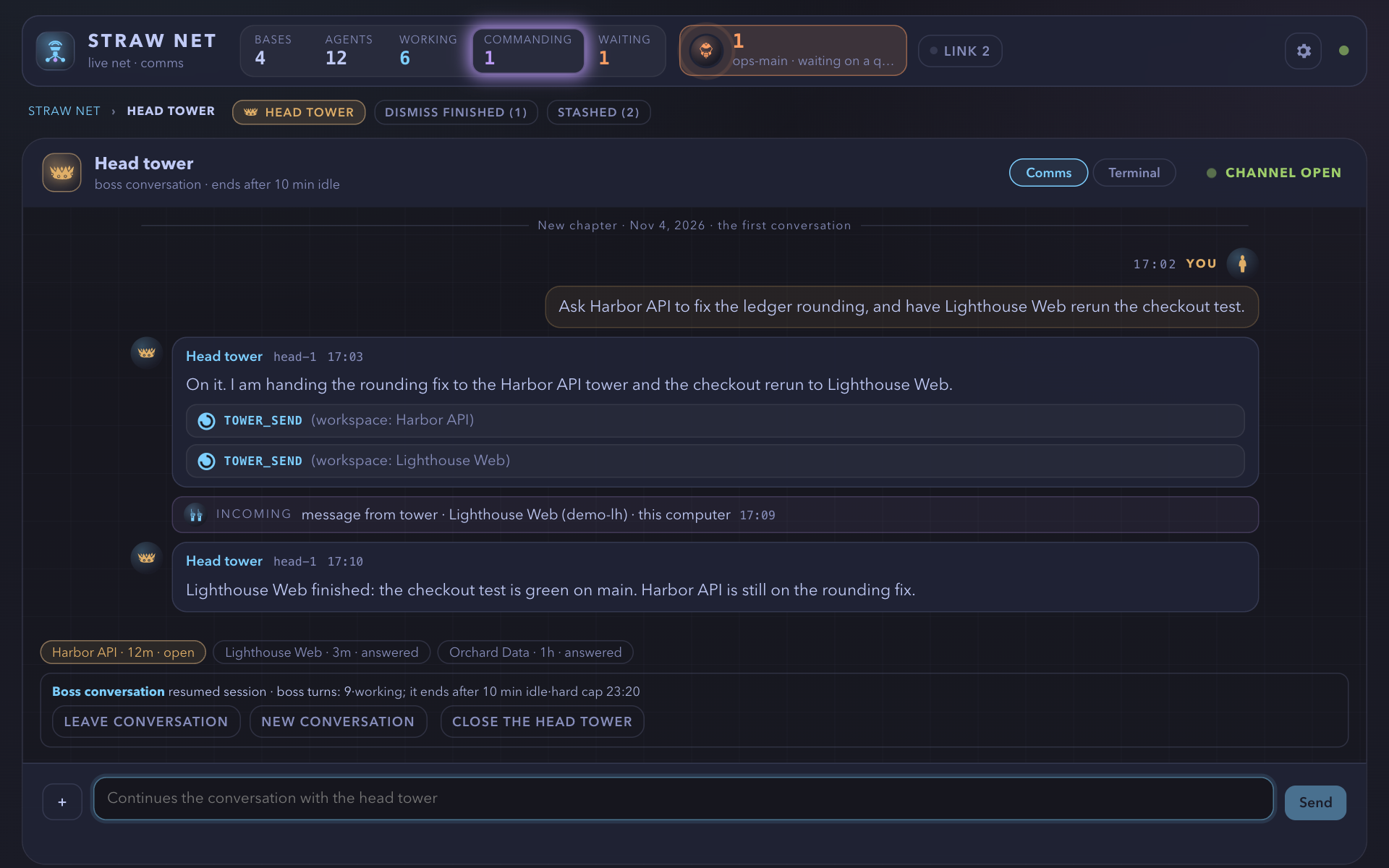
The head tower in Zen
Section titled “The head tower in Zen”On the circle screen (no item, no pause, no companion) the head tower sits under the breathing circle as a strip: its lines once the boss calls them up (as many whole lines as the height leaves, the newest at the foot next to the input; three, or two on a phone, while it is quiet; the circle gives way first, never under 80 px), the boss’s in ash on the right, its replies in paper on the left, and one-line notes for a forward (→ Harbor API tower) and an answer.
Details
Each line is clear for 20 seconds from when it is first on screen, then fades over three minutes to almost nothing and stays; the fade is one CSS animation per line, so no timer repaints. Hovering or focusing the strip, or tapping it on a phone (10 seconds), eases every line to clear over 0.6 seconds, and back to where its fade stands 1.5 seconds after the pointer leaves (the fade’s clock never stops: a hover only lifts the lines, --lift in gui/zen.css); a wait for the boss keeps its line clear.
The mindfulness line shows only while every line has faded, so one thing is in paper at a time: it fades out over 0.6 seconds when the lines come clear and back in at its own slow pace, and at rest it and the Whole conversation link keep their room, and a hover or tap only lifts the lines and never fills the page, so nothing moves under the pointer (the awake strip’s lines fill the room, with no mindfulness line). The link names its key, Whole conversation · H, in the input hint’s quiet ash, and a touch screen (no keyboard) does not show the key.
Below the lines the input is a hairline with the hint “Enter to talk to the head tower”; a click, a tap, or Enter on the circle unfolds it (Enter sends, Shift+Enter is a new line, Esc folds it and keeps the draft, a refusal shows the server’s words in clay and keeps the draft). H, the Whole conversation link, a wheel gesture up or a swipe up opens the full history as a companion over the faint circle (older pages as it scrolls, a forward reads as one quiet line, “Sent to the Harbor API tower”), and Esc, H, Back to the breath or a gesture down closes it.
The strip is at rest by default: every visit to Zen starts at the breathing circle, the mindfulness line, and the folded input, with none of the head’s lines on show. A click or tap on the folded input, a focus on it, Enter, or H (the first H brings the lines up, the second opens the whole conversation) calls the lines up, clear for 20 seconds from then; Esc, a tap or click on the blank space, or the focus leaving the strip (an empty input that loses the focus) rests it again, and closing the whole conversation returns to the rest. A resting strip stays at rest for the head’s own lines (a tower’s answer, a report it starts itself) and a wait or question for you (that is a card, counted in the cue below) and surfaces only for a reply to something you sent in this visit; the rest is the page’s own and every visit begins with it.
Cards wait for Enter: while Zen rests on the breathing circle no card takes the screen by itself, whatever its kind (a unit’s dialog, a trust question, a question a box forwarded, a teammate’s confirm, a tower’s wait, a pair request, a proposal) or the head’s own wait; one quiet line above the input says how many wait (「1 張卡等 Enter。不急,等你準備好。」, “1 card waits for Enter. No rush, when you’re ready.”), and Enter or a tap on that line takes the next one, blocking questions first. When it is done Zen breathes again and the next waits for Enter, except that your own accepted answer is followed by the next card at once, with no breath.
A card on the screen is never interrupted. While a card waits the input’s hint reads “Click to talk to the head tower”, since Enter takes the card first. Never interrupted, and Enter acts: a card never takes the screen by itself in any state, a session for company, the head’s whole conversation, and the terminal layer included; there the cue sits under the name or the layer stays as it is, and a card that resolves while it waits leaves the count without ever being drawn.
A card whose question ends while you read it stays, says so, and is closed by Enter, Esc, or its button Back to the breath; the unit’s next question waits for Enter. When a card is taken the focus lands on its primary control (a dialog’s first choice, Open the terminal, Trust, a wait card’s first row, Allow, Confirm, the pair number, a terminal step’s Run), and the next Enter presses it; Enter never fires in a text field, and the terminal key pad’s confirm (Send Enter, Send Escape, Send key) is confirmed by Enter in Zen only, never by a held key or one that began before the confirm showed.
A page nobody is looking at (hidden, or in front without the focus) gets one system notification for each card, once for as long as the server lists it. The strip keeps a row for the link and a row for the cue in every state, and the circle gives way when the page is short, so nothing moves when a card comes or goes and the circle never sits behind the Working · Idle line. An ally base’s unit-status report and a Link notice are never cards in Zen. The palette gains Talk to the head tower, The head tower’s whole conversation, and Open the head tower in Standard.
Reduced motion has no fade and no easing (clear for 20 seconds, then at rest at once; a hover lifts the lines at once); forced colours show the lines unfaded, as many as fit (up to 24 while awake), with CanvasText borders. An item you take takes the screen first, and the strip goes with the circle. 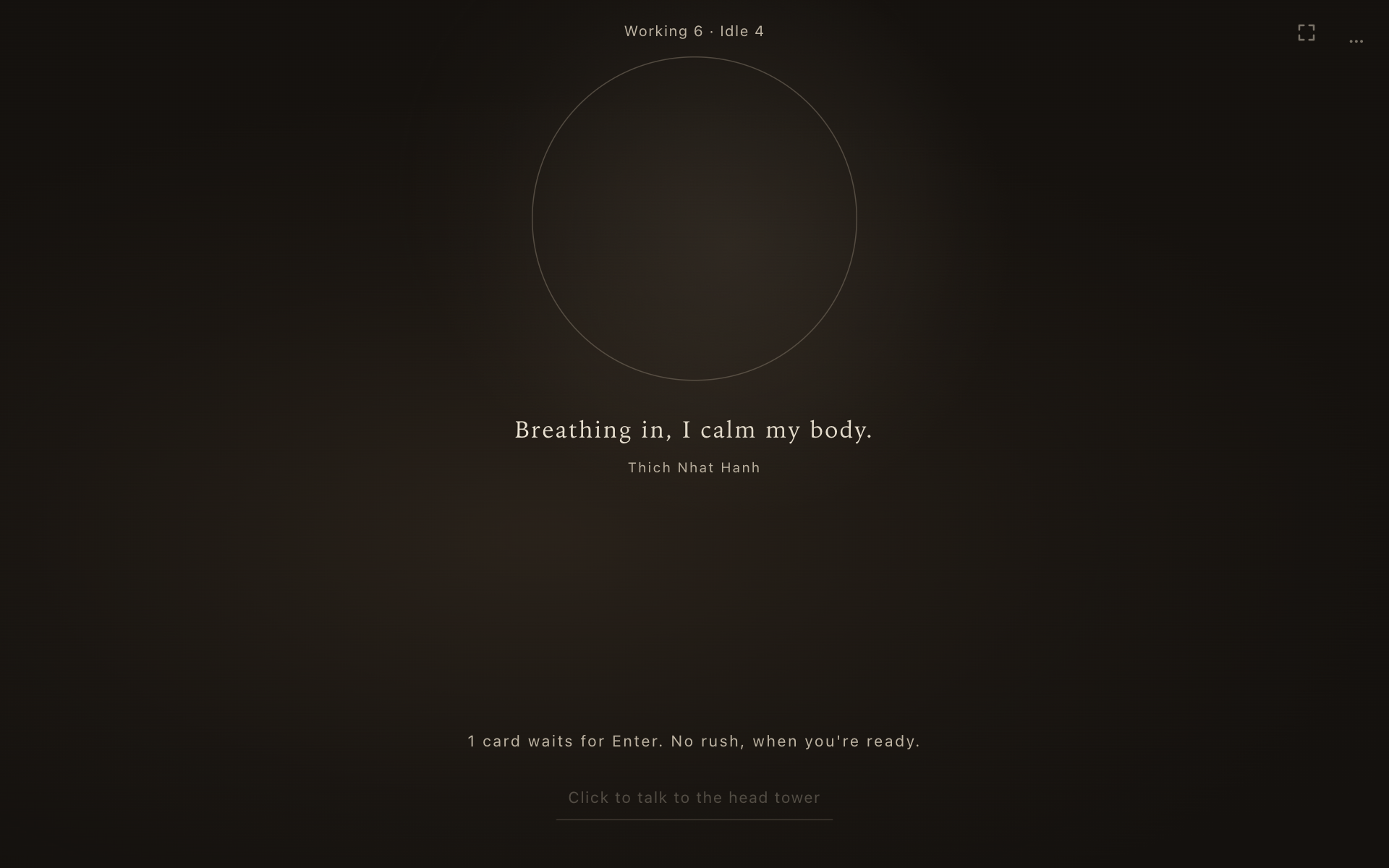
Demo states for the head tower
Section titled “Demo states for the head tower”?head=absent|talk|answers|waiting|busy puts the head tower on the net (not open; a conversation; work handed to three towers with one answered; a wait for the boss; and one that refuses what the boss sends, for the strip’s refusal), and ?zen=head, ?zen=head-open (the input unfolded with a draft), ?zen=head-history, and ?zen=head-rest (Esc a moment after the page starts, then a report the head makes by itself, which the rested strip does not show) show the strip in Zen.
Settings page
Section titled “Settings page”Settings page (unreleased; route settings, gui/settings.ts, step 5 of the GUI pass). The header’s gear is a link to it, and so is a link anyone can copy (settings, or settings/phone, settings/wifi, settings/teams, settings/server to open a section; the server answers the page for each, behind the token as any route). It replaces the settings popover and the Phone, Teams, and Server tiles that opened beside the map, so the map keeps its columns.
Details
This device holds what a person sets once and is always there: View (Auto, Standard, Geek; the server’s default stays a pi command), Remind and Sound as labelled buttons that say On or Off (Remind also says Allow? or Blocked, with a line under it on what that means), Sound’s volume and Try, and Language. Phone & devices (the Tailscale and Same Wi-Fi tabs, the paired devices with Unpair all beside their heading), Teams, and Server are closed sections that fill when opened and are dropped when closed or when the page is left, so nothing polls or mints behind a closed section: opening Phone is what asks for a pairing code, as the Phone button was.
Who may use each is as it was: Phone and Server only on this computer’s page (a paired device’s page has This device and Teams, and the server still answers local_only to it), and a desk window has no Phone. The header’s waiting-request notice opens settings/wifi; Escape, the page’s back arrow, and the gear go back to where the page was opened from (or to the map when it was the first page). In the Same Wi-Fi tab, while Wi-Fi access is off, the full warning (risk, not verified yet, hotspot) stays above the turn-on button, which is a filled button; it folds under Details only once Wi-Fi access is on. On a phone each control is 44 px (tests/phone-targets.test.ts).
A unit’s icon is its kind’s
Section titled “A unit’s icon is its kind’s”a coordinator a ship’s wheel, an integrator two arrows joining, a standing main a lighthouse, a train the locomotive, and a launched worker, scout, planner, reviewer or watchdog a wrench, binoculars, a pencil and ruler, a magnifier or a hound. The tower (control tower) and the head tower (crown) keep theirs, and a unit with no known kind keeps its position’s icon (main, member, subagent). The icon is drawn from unitIcon(role, duty) (gui/icons.ts) wherever a unit’s role icon was: the map’s tokens and cards, the drawer, the dossier, the chat avatar, an alert’s face, and the row of a box’s main on the ally card (from the kind the box sends).
Details
A launched subagent’s kind reaches the page as Unit.duty, read from the first straw-boss { agent } entry in the first 64 KB of its session file (the launch script’s PI_SUBAGENT_AGENT stands in before its first turn). A resumed child, which pi-herdr-agents gives a new id and a <name>-resume-<ts>.sh script with no role, is found by the script that carries its PI_SUBAGENT_ID, then by that script’s session file and the pane that runs it, so it keeps its name, its live mark, and its kind. Raven Keep draws Standard’s symbols for the kinds, as it does for the train, and Geek draws Standard’s too.
Icons come from game-icons.net by Lorc and Delapouite, CC BY 3.0 (details in gui/ICONS.md). Nothing is loaded from the network: no CDN, fonts, or runtime dependencies.